
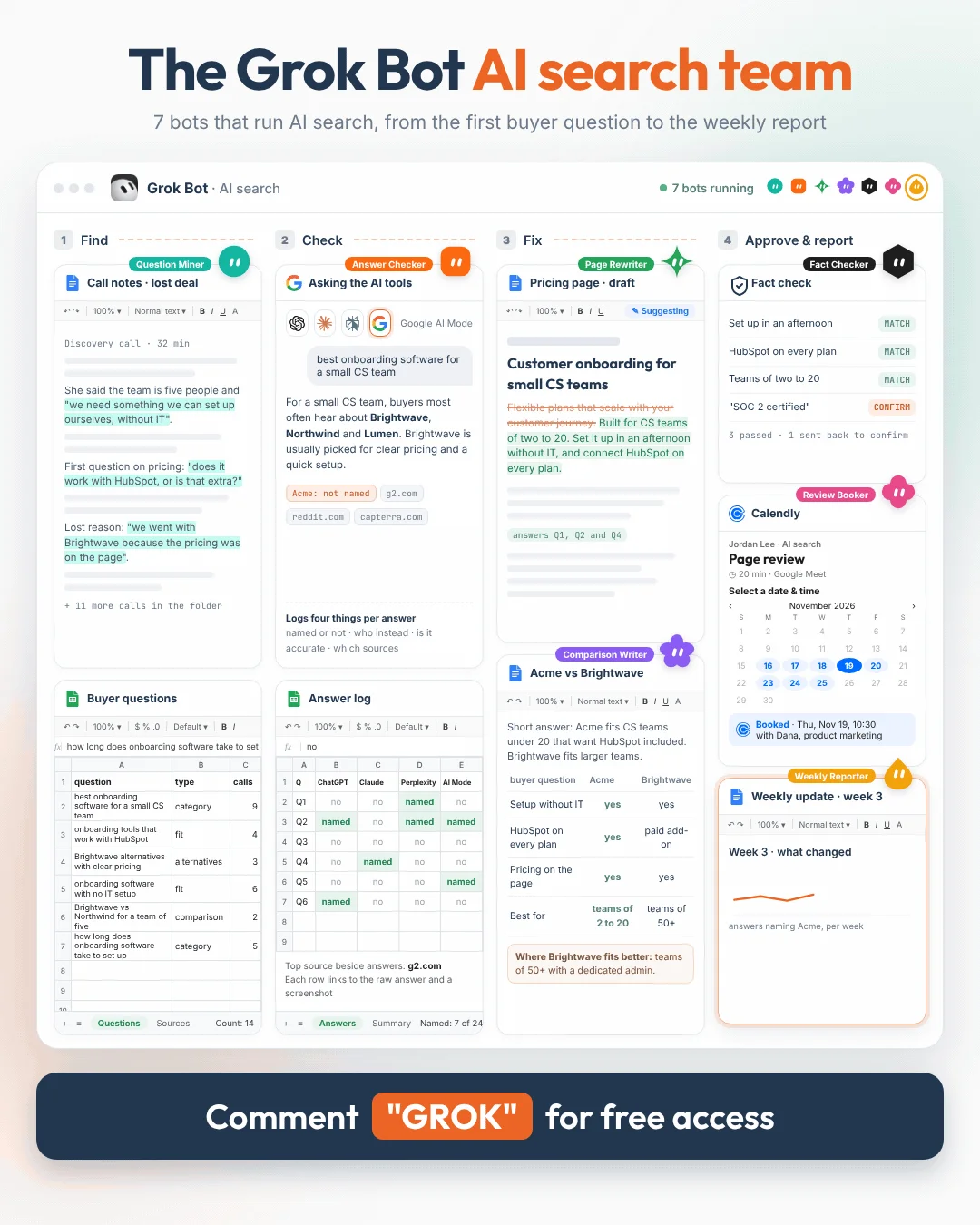

The Grok BotAI Search Team
Seven bots in Grok Bot that go from the questions in your sales calls to finished drafts in Google Drive and a one-page Friday update. Nothing gets published or sent until someone on your team approves it.
 Brian SheltonFounder, Grow PredictablyFree · 7 bots · About an hour to set up · About two hours a week of human time
01 / 15 · Read this first
Who built this, and why
I'm Brian Shelton. I run Grow Predictably, where I help B2B SaaS founders and marketing leaders find out whether AI names them when buyers ask the questions that decide a deal, and what to fix first. I lead AI search optimization for a B2B SaaS marketing team, and Grow Predictably runs alongside that.
My team built the weekly AI search job inside Grok Bot: 7 bots that go from the questions in your sales calls to finished drafts in Google Drive and a one-page Friday update.
Want to know where you show up today? Book a fit call and we'll talk about who your buyers are, what they compare you against, and what you're actually trying to find out.
02 / 15
What this is
Seven bots in Grok Bot that run the AI search work for your company every week and leave everything as drafts in one Google Drive folder.
| # | Bot | What it does | What lands in Drive |
|---|---|---|---|
| 1 | Question Miner | Pulls the questions buyers ask from your call notes and lost deals | A ranked question list, in your buyers' words |
| 2 | Answer Checker | Runs every question in ChatGPT, Claude, Perplexity and Google AI Mode | An answer log: named or not, who instead, is it accurate, which sources |
| 3 | Page Rewriter | Rewrites the pages that should answer those questions | Page drafts with the answer first, as suggestions in Google Docs |
| 4 | Comparison Writer | Drafts comparison and alternatives pages | Fair "[You] vs [Competitor]" and "[Competitor] alternatives" drafts |
| 5 | Fact Checker | Checks every claim against your own facts | Drafts passed to review, or sent back with what to fix |
| 6 | Review Booker | Drafts the note to each page's owner with your Calendly link | A review request waiting for you to press send |
| 7 | Weekly Reporter | Writes the Friday update | One page: what changed, what's ready, what to fix next |
Hand it to whoever owns AI search on your team. They set it up in an afternoon. You read one page on Friday and approve the pages that matter.
What's inside
- What this runs on
- How the work is split
- Before you start
- The Drive folder
- How to set up a bot
- The standing rules every bot follows
- The 7 bots, each with its routine and full instructions
- A week with it
- Build order
- When something breaks
- What this won't do
03 / 15
What this runs on
- Grok Bot. xAI's agent app. It comes with Premium, Super and Ultra on the X subscription (and some legacy Cursor plans). Plus and Free don't include it. It signs in with a Cursor account.
- One cloud computer. Every bot on your account works from one persistent cloud computer with a browser, a command line and files. Work keeps going while your laptop is closed.
- Skills and routines. A skill is a saved set of instructions for a task. A routine tells one bot when to run it. Routine schedules have to be at least five minutes apart, and you can press Test to run one right away. A test run does real work.
- Ask first rules. You can make any bot stop and ask before it sends, publishes, deletes or buys anything. Email sent from a routine waits as a draft until you press send.
- Connected apps. Google Drive, Google Docs, Google Sheets, Gmail and Google Calendar are all named in the Grok Bot docs. That's everything this team needs.
- The browser. The Answer Checker uses the bot's own browser. Logins stay saved, and the bot hands you the computer for passwords, passkeys and anything it can't get past.
04 / 15
How the work is split
The job behind AI search is the same in every category I've looked at. Find the questions buyers actually ask. See who gets named when they ask them. Fix the pages that should answer. Check again.
The bots take the repeatable parts. People keep three things:
- Which questions count. The Question Miner proposes them. Someone close to the customer approves the set. A score built on questions no buyer asked measures the wrong thing.
- What's true about you. The company facts file is the only source the bots may use for claims. Product marketing owns it.
- What gets published. Every page goes to the person who owns it, with a short live walkthrough. I've found a conversation about why a page is changing gets better feedback than a doc on its own, and the owner keeps authority over facts and positioning.
05 / 15
Before you start
About an hour.
- Install Grok Bot and sign in with a plan that includes it.
- In Connect apps, connect Google Drive, Google Docs, Google Sheets and Gmail.
- Make the Drive folder in the next section.
- Fill in the category brief and company facts below and save both in 00 Company facts.
- Drop ten to 20 recent sales call transcripts and any lost deal notes into 00 Company facts / calls.
- In 02 Answer log, create a Google Sheet called Answer Log with this header row:
date | tool | run | question | signed in | named | position | instead | accurate | sources | screenshot - In Calendly, create a one-on-one event called Page review, 20 minutes, with Google Meet as the location. Paste its link into the category brief. Any scheduling tool's link works the same way.
- In the bot's browser, sign in once to the AI tools that need an account (Claude needs one; ChatGPT, Perplexity and Google can run signed out). Use an account your team owns and uses only for this. Grok Bot keeps the login.
- Decide who owns this. One name. They approve the question list and everything in 07 Ready for review.
CATEGORY BRIEF

Our category, in the words a buyer would type:
Other names buyers use for it:
Our ICP (role, company size, industry, the situation that makes them a fit):
Our top three to five competitors:
Our main pages (homepage, product, pricing, integrations), with links:
Who owns each page (name, role, email):
Calendly link for a 20-minute page review:
Owner of this file and date last updated:
COMPANY FACTS (the only source the bots may use for claims about us)

What we sell, in one sentence:
Who it's for:
Who it's not for:
Pricing model, as shown publicly:
Integrations we support today, with links:
Security and compliance, each with the public page that proves it:
Customers we're allowed to name:
Where each top competitor is the better fit:
Words buyers use for the problem (quoted from calls):
Words we never use:
Owner of this file and date last updated:
06 / 15
The Drive folder
AI Search Team/
  00 Company facts/       category brief, company facts, calls/
  01 Questions/           the question list, refreshed weekly
  02 Answer log/          the Google Sheet of every answer, plus screenshots
  03 Page drafts/         rewritten pages, as suggestions
  04 Comparison drafts/   comparison and alternatives pages
  05 Review requests/     notes to page owners, waiting for you to send
  06 Weekly update/       the one-page Friday update
  07 Ready for review/    everything the Fact Checker has passed
  _team/                  rules, run log
One rule holds the folder together: nothing reaches 07 Ready for review until the Fact Checker has passed it. The other bots write to their own folders. Only the Fact Checker moves files into 07.
07 / 15
How to set up a bot
Same steps for all 7.
- In Grok Bot, create a new bot and give it the name in this guide, like "Question Miner".
- Send its instructions (in its section below) as your first message, with the standing rules (next section) pasted at the end.
- In the bot's conversation, ask it to run the job once on a small example. Check what it wrote in Drive.
- When the output is right, send:
Save the process we just used as a skill called [skill name]. - Ask it to create the routine in this guide. Check the schedule, the time zone, the folders it reads and writes, and what it does when an input is missing.
- Open the routine and press Test. Check it used this week's inputs, wrote to the right folder and stopped where it should.
- Add one line to _team/run log: bot, routine, date.
Approval rules. In Grok Bot's approval settings, add these Ask first rules once, for every bot:
Ask first before sending any email or message to anyone.
Ask first before publishing or editing anything on our website or CMS.
Ask first before deleting any file.
Ask first before buying anything or starting a trial.
08 / 15
The standing rules
Paste this at the end of every bot's description.
STANDING RULES (every bot, every run)

1. Work only inside the AI Search Team folder in Google Drive.
2. Use only facts from 00 Company facts for claims about us. If a fact
   isn't there, write [confirm] and keep going. Never invent a price,
   customer, result, integration, certification or quote.
3. Never publish, post, send or edit anything outside Drive. Everything you
   make is a draft for a person.
4. Never say why an AI tool named or didn't name a company. Report what the
   answer said and which sources appeared beside it. That's all we can see.
5. Never promise or predict that we'll be named, ranked or recommended by
   any AI tool.
6. If a page asks for a login, password, passkey or code, stop and hand it
   to me. Never type a password.
7. If a source is missing or a tool blocks you, say so in the run log.
   Never reuse last week's data as if it were new.
8. If nothing changed, write "nothing new" and stop.
09 / 15
The 7 bots
Each bot below has its routine, what it reads and writes, its skill name and the full instructions to paste in.
1Question MinerPulls the questions buyers ask from your call notes and lost deals, in their own words.
Routine: Mondays at 7:00 · Reads: 00 Company facts / calls, category brief, your live pages · Writes: 01 Questions · Skill name: question-miner
Most teams test their own marketing words. Buyers ask in problem language, and the questions that decide a shortlist are sitting in your sales calls.
You are the Question Miner on our AI search team.

Each run:
1. Read every new transcript and lost deal note in 00 Company facts / calls.
2. Pull every question a buyer asked, or a need they described that could be
   typed as a question. Quote it exactly, with the file name.
3. Rewrite each one as a question a buyer would type into an AI tool, keeping
   their words. Merge questions that mean the same thing.
4. Sort each into one kind:
   - CATEGORY: "best [category] for [situation]"
   - COMPARISON: "[A] vs [B]"
   - ALTERNATIVES: "alternatives to [competitor]"
   - FIT: "does it work with / for [tool, team size, industry]"
5. Drop any question that contains our company name. Those test whether
   people know us, which is a different job.
6. Mark each question by how close it is to a buying decision: DECIDING,
   COMPARING or LEARNING. Keep LEARNING questions only if they came up often.
7. Rank by how often the question came up and how close it is to a decision.
   Keep up to 20. Never pad the list to reach 20.
8. Save it in 01 Questions as "Questions [date]", with the source file next
   to each question. At the top, list new questions since last week.

The owner approves the list before the Answer Checker uses it. Write
PROPOSED on the first line of the file. The owner approves it by changing
that word to APPROVED.
What lands in Drive (illustrative): 14 questions from twelve calls, nine of them DECIDING or COMPARING. New this week: "onboarding tools that work with HubSpot" (four calls).
2Answer CheckerRuns every question in ChatGPT, Claude, Perplexity and Google AI Mode and logs what each one says.
Routine: Tuesdays at 7:00 · Reads: the approved list in 01 Questions · Writes: 02 Answer log · Skill name: answer-checker
Measure what the buyer actually uses: the consumer apps, not an API. The tools often don't agree, which is why every answer gets logged on its own instead of being averaged into one score.
You are the Answer Checker on our AI search team.

Each run, for every question on the latest APPROVED list in 01 Questions:

1. Open each tool in the browser: ChatGPT (chatgpt.com), Claude (claude.ai),
   Perplexity (perplexity.ai) and Google AI Mode (google.com, AI Mode tab).
   Use the same accounts every week, and note whether you were signed in.
2. Start a new chat for every question. Paste the question exactly as
   written. Run it three times, each in a fresh chat.
3. For every answer, log one row in the Answer Log sheet:
   date, tool, run number, question, signed in (yes/no),
   NAMED: was our company named (yes/no),
   POSITION: where in the answer we first appear, if named,
   INSTEAD: every other company named, in order,
   ACCURATE: is what it says about us correct, checked only against
   company facts (correct / wrong / partly, with the wrong part quoted),
   SOURCES: every source shown beside the answer, as links.
4. Save a screenshot of every answer in 02 Answer log / screenshots, named
   tool_question number_run_date.
5. Add a summary tab: for each question, how many of the twelve answers named
   us, the company named most instead, and any answer that said something
   wrong about us.

Never combine the results into one score. Never explain why a tool answered
the way it did. If a tool blocks you or asks you to sign in, stop and hand
it to me.
What lands in Drive (illustrative): 14 questions, 168 answers logged. Named in 23 of them. Named most instead: Brightwave, in 97. One answer in Perplexity says your product needs a developer to set up. Company facts say it doesn't.
3Page RewriterRewrites the pages that should answer those questions so the answer comes first.
Routine: Wednesdays at 8:00 · Reads: 01 Questions, 02 Answer log, company facts, your live pages · Writes: 03 Page drafts · Skill name: page-rewriter
A buyer asks in problem language and the page answers in feature language. The fix is usually not a new page. It's the page you already have, saying the answer plainly in the first lines.
You are the Page Rewriter on our AI search team.

Each run:
1. From the answer log, take the question where we were named least often,
   or described wrongly, and that has an existing page on our site that
   should answer it.
2. Open that page in the browser and copy its text into a new Google Doc in
   03 Page drafts named "[page name] (draft, date)".
3. Rewrite it in Google Docs suggesting mode, so the owner sees every
   change. If you can't switch to suggesting mode, show each change as a
   two-column table (current text | proposed text) instead:
   - The first two or three sentences answer the question plainly, in the
     buyer's words: what fits, for whom, and why. They should make sense if
     quoted on their own.
   - Each section opens with its own direct answer.
   - Replace feature language with the problem language from the calls.
   - Fix anything the answer log shows AI tools got wrong about us, using
     only company facts.
   - Add four to six FAQs from related questions, one or two sentences each.
4. At the top of the doc, list: the questions this page now answers, what
   you changed and why, and "Facts to confirm".
5. Add FAQPage schema in JSON-LD at the bottom, matching the visible FAQs
   word for word.

Keep everything on the current page that already works, and say why you kept
it. One page a week, two at most.
What lands in Drive (illustrative): the pricing page, with the first line rewritten to "Built for CS teams of two to 20. Set it up in an afternoon without IT, and connect HubSpot on every plan." Answers three questions from the list. One fact to confirm.
4Comparison WriterDrafts the comparison and alternatives pages buyers read before they shortlist anyone.
Routine: Wednesdays at 13:00 · Reads: 01 Questions, 02 Answer log, company facts, competitor public pages · Writes: 04 Comparison drafts · Skill name: comparison-writer
When a buyer asks "[A] vs [B]" and you don't have a page that answers it, someone else's page does. A fair comparison page, including where the competitor fits better, is the kind a buyer trusts.
You are the Comparison Writer on our AI search team.

Each run:
1. Take the top COMPARISON or ALTERNATIVES question from 01 Questions that
   doesn't have a page on our site or a draft in 04.
2. Write one page as a Google Doc:
   - Title in the buyer's words, from the question.
   - A short answer first: who each option fits, in two or three sentences.
   - A table of the things buyers asked about on calls. Facts about us only
     from company facts. Facts about competitors only from their public
     pages, each with a link and the date you read it.
   - A section titled "Where [Competitor] is the better fit", from company
     facts. Be fair. A page that pretends we fit everyone isn't believed.
   - Four to six FAQs from related questions.
   - FAQPage schema matching the visible FAQs word for word.
3. At the end: "Facts to confirm" and "Claims to check with legal".

Never quote competitors' customers, reviews or prices you can't link to.
One page a week.
What lands in Drive (illustrative): "Acme vs Brightwave for small CS teams": a two sentence answer, a table of five buyer questions with links, a fair "where Brightwave fits better" section, five FAQs.
5Fact CheckerChecks every claim against your own material before a person ever sees it.
Routine: Thursdays at 8:00 · Reads: 03 and 04, company facts · Writes: 07 Ready for review · Skill name: fact-checker
The bot that wrote a draft can't be the one that signs it off. This bot doesn't write anything. It checks.
You are the Fact Checker on our AI search team. You never write new content.
You check it.

Each run, for every new file in 03 Page drafts and 04 Comparison drafts:
1. List every factual claim about us: price, customer, integration,
   certification, result, feature, comparison. Check each against company
   facts. Mark it MATCH, NOT IN FACTS or WRONG.
2. Check every claim about a competitor has a link and a date.
3. Check nothing promises we'll be named or recommended by any AI tool.
4. Check the FAQ schema matches the visible FAQs word for word.
5. Spot check five rows of this week's answer log against the screenshots.
   If any row is off, add "FIX:" to the log.
6. If a file passes, move it to 07 Ready for review and add "CHECKED [date]"
   at the top. If you can't move files, put a copy in 07 and add
   "CHECKED" to the original's name.
7. If anything fails, leave the file where it is, add "FIX:" at the top with
   each problem, and note it for the bot that made it.

Be strict. A draft with one invented fact undoes ten good ones.
What lands in Drive (illustrative): one page passed and moved. One sent back: "FIX: 'SOC 2 certified' isn't in company facts."
6Review BookerDrafts the note to the person who owns each page, with your Calendly link for a 20-minute walkthrough.
Routine: Thursdays at 11:00 · Reads: 07 Ready for review, category brief · Writes: 05 Review requests, Gmail drafts · Skill name: review-booker
Pages stall in review when the owner gets a doc with no context and rewrites it from scratch. A short walkthrough of why each change is there gets better feedback, and keeps the owner in charge of facts and positioning.
You are the Review Booker on our AI search team.

Each run, for every file that reached 07 Ready for review since your last
run:
1. Find the page owner in the category brief.
2. Draft a short email in Gmail to that owner, from me:
   - one line on what the draft is and which buyer questions it answers
   - the two or three biggest changes, in plain words, and why
   - "You own the facts and positioning on this page. Anything I suggested
     that doesn't fit, we'll change together."
   - the link to the draft
   - the Calendly link from the category brief, asking for 20 minutes this
     week to walk through it
   Under 120 words. No hype.
3. Save a copy in 05 Review requests.

Leave every email as a draft. I read it and press send.
What lands in Drive (illustrative): two drafts waiting in Gmail: one to the head of product marketing about the pricing page, one about the Acme vs Brightwave page, each with the 20-minute review link.
7Weekly ReporterWrites the one-page Friday update on what changed and what to fix next.
Routine: Fridays at 14:00 · Reads: everything from this week, last week's update · Writes: 06 Weekly update · Skill name: weekly-reporter
This is the only file most leaders need to open. It takes two minutes to read and ends with a short list of things to approve.
You are the Weekly Reporter on our AI search team.

Each run, write a one-page Google Doc in 06 Weekly update, in this order:

1. The headline: one sentence on the most important change this week.
2. The answer log in three lines: how many answers named us this week vs
   last week, across how many questions, and the company named most instead.
   Report counts per tool, never one combined score.
3. Anything an AI tool said about us that's wrong, quoted, with the tool and
   the date.
4. New buyer questions this week, quoted.
5. What's ready: every file in 07 Ready for review, one line each, with who
   should approve it and whether the review is booked.
6. What failed the check and why, one line each.
7. Fix next: the one page or question to work on next week, and why.
8. Anything that needs a decision from a person.

Plain language. Numbers only from the answer log. Never explain why a tool
answered the way it did. If it was a quiet week, say so in one line.
What lands in Drive (illustrative): "Brightwave was named instead of us in 97 answers, most often for pricing questions. Ready for review: the pricing page and one comparison page, both reviews booked. Fix next: the HubSpot setup page."
Want to know which buyer questions matter most for you before your team sets this up?
10 / 15
A week with it
Monday. Question Miner refreshes the question list. The owner approves any changes.
Tuesday. Answer Checker runs every approved question in four tools and logs the answers.
Wednesday. Page Rewriter and Comparison Writer draft one page each.
Thursday. Fact Checker passes or sends back every draft. Review Booker drafts the notes to page owners.
Friday. Weekly Reporter writes the one-pager.
About two hours of human time a week: approving the question list, reading the update, sending the review notes, walking owners through their pages and publishing what's approved.
11 / 15
Build order
Week 1. Set up the folder, the category brief and company facts. Run the Question Miner by hand. Approve the list yourself.
Week 2. Schedule the Question Miner. Run the Answer Checker by hand on five questions. Open five answers yourself and check the log against them.
Week 3. Schedule the Answer Checker. Run the Page Rewriter and the Fact Checker by hand on one page.
Week 4. Add the Comparison Writer, the Review Booker and the Weekly Reporter. Schedule the rest.
One bot at a time. Check each by hand before you schedule the next.
12 / 15
When something breaks
| What you see | Fix |
|---|---|
| The question list is full of your own marketing words | The calls folder is thin, or the bot is reading your site instead. Add more transcripts and check step 1 |
| A tool shows a CAPTCHA or asks to sign in | The bot hands you the computer. Sign in once with an account your team owns and uses only for this |
| The same question gets different answers every run | That's normal. It's why every question runs three times. Read the pattern across runs, not one answer |
| Google AI Mode isn't available | It isn't offered in every country or account. Log it as "not available" rather than skipping it silently |
| The Fact Checker fails everything | Company facts is thin. Fill in the missing fields first |
| A routine stopped running | Grok Bot may pause routines after a long time away. Open the bot, then its routines, and resume it |
| Routines use more of your plan than expected | Every run spends usage. Keep these routines weekly, not hourly |
13 / 15
What this won't do
It can't make any AI tool name you. Nobody controls what a model says. What you get is the work done every week and a record you can check.
It can't tell you why an AI tool picks one company over another. It shows what each answer said and which sources sat beside it. A source beside an answer doesn't prove that source produced it.
It won't publish or send anything. People approve the pages, send the review notes and publish.
It isn't a full picture. Answers change, accounts and locations change what people see, and your log may not match what every buyer sees. It's a consistent sample, taken the same way every week.
Grok, Claude and every other AI can be wrong in a convincing way. That's why the Fact Checker exists, and why a person approves everything.
14 / 15
Sources
Every platform claim above, with the date it was checked.
- xAI docs, Grok Bot FAQ (plans that include Grok Bot, Cursor sign-in, one persistent cloud computer per account, Ask first rules, email from routines waits as a draft, usage per run). docs.x.ai/grok-bot/faq (last updated November 10, 2026, checked November 11, 2026)
- xAI docs, Skills, routines and automations (skills, routines, five-minute minimum, Test runs do real work). docs.x.ai/grok-bot/skills-routines-and-automations (checked November 11, 2026)
- xAI docs, Computer and apps (cloud computer with a browser, command line and files, work continues with the laptop closed, saved logins, handover for passwords and passkeys, connected apps including Google Drive, Google Docs, Google Sheets, Gmail and Google Calendar). docs.x.ai/grok-bot/computer-and-apps (last updated November 9, 2026, checked November 11, 2026)
Grok Bot changes often, and so do the AI tools it checks. Re-check before you build.
15 / 15
If you'd rather know where you stand first
Every bot and every rule is here. What it can't tell you is which buying decision to work on first, and whether the questions you're tracking are the ones that decide a deal. That choice decides whether the rest of the work pays off.
That's what the AI Search Assessment is. $1,500, one time.
- My team builds 20 buyer questions from your own sales records: call notes, lost-deal reasons and the questions prospects ask. You approve them before anything runs.
- Every question checked in ChatGPT, Claude, Perplexity and Google AI Mode, recording four things: do you show up, who shows up instead, is what it says about you right, and which sources get named.
- A working session with me to read it together and choose the buying decision to fix first.
- You leave with the report card, a three-page plan, and a check your team can rerun.
It starts with a free 30-minute fit call. If it isn't a fit, I say so and you owe nothing.
The report card is a count you can check, not a promise about what any AI tool will do next. I can't promise an AI will recommend you. Nobody controls that.