
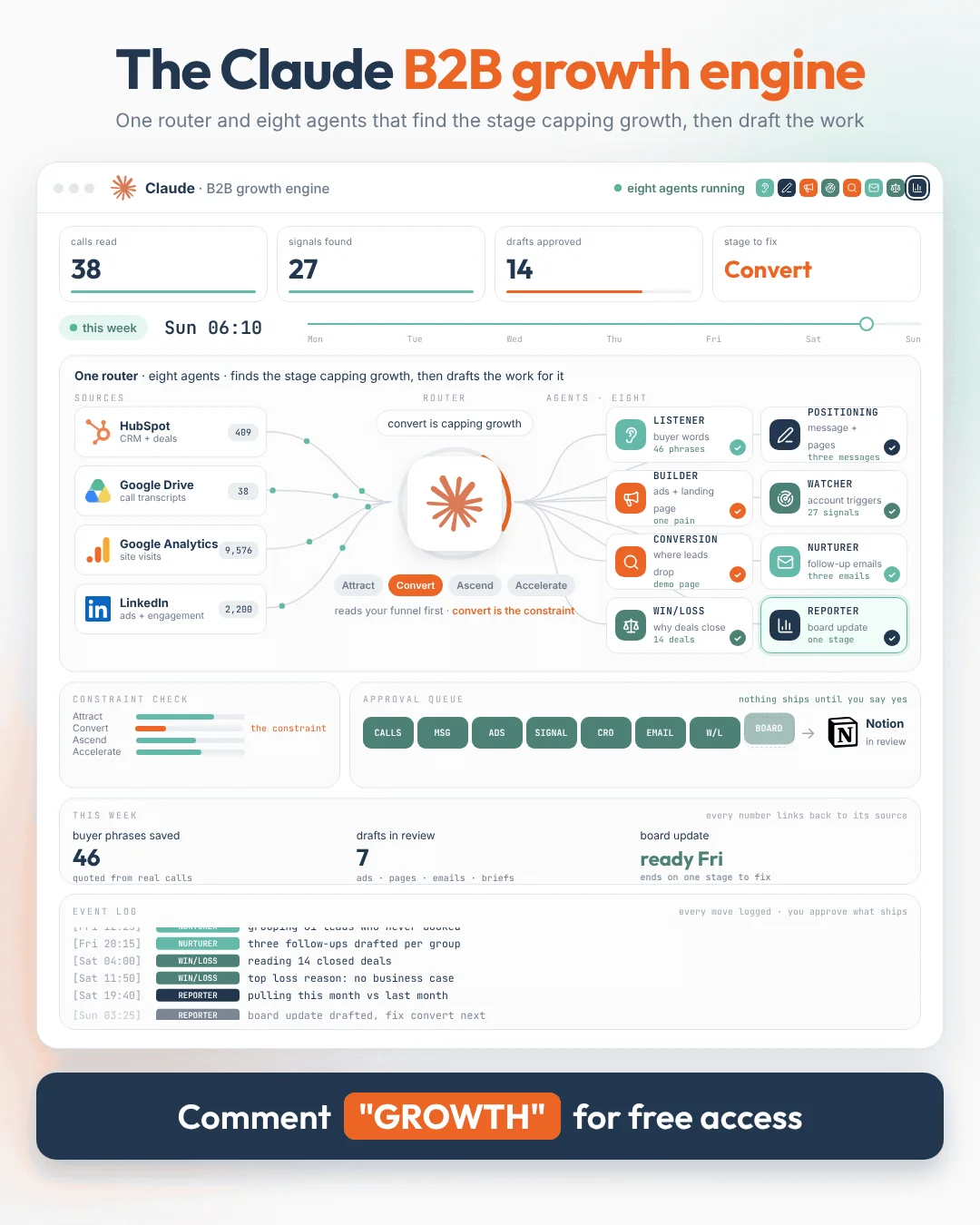

The ClaudeB2B Growth Engine
One router and eight agents in Claude that draft the growth work every week, from positioning and campaigns to conversion and the board update, and leave all of it on one Notion board for your team to approve.
 Brian SheltonFounder, Grow PredictablyFree · 1 router and 8 agents · About 90 minutes to set up · About an hour a week reviewing
01 / 12 · Read this first
Who built this, and why
I'm Brian Shelton. I run Grow Predictably, where I help B2B SaaS founders and marketing leaders find the one thing capping their growth and fix that first. I lead AI innovation for a B2B SaaS marketing team, and Grow Predictably runs alongside that.
I set the direction for this one and my team did most of the building. It's eight agents and a router in Claude, drafting the growth work every week, from positioning and campaigns to conversion and the board update, and leaving all of it on one Notion board for your team to approve.
Want to see where your growth is stuck right now? Take the free Growth Gap Scan. It's 16 questions, takes about two minutes, and scores you across the four growth pillars with practical next steps.
02 / 12
What this is
A B2B growth engine inside Claude. One router and eight agents run on a schedule, read the same three Notion pages and leave their drafts as cards on one Notion board. The work is waiting when your team sits down.
The router is the part most setups skip. Before any agent starts, it reads your funnel numbers and names the stage that's capping growth this week. Every agent reads that note first, so the week's effort goes where it changes the result instead of being spread across the whole funnel.
| # | Agent | What it reads | What it leaves on the board |
|---|---|---|---|
| 0 | The Router | HubSpot, the Monday exports | The stage capping growth, and which agents work on it this week |
| 1 | The Listener | Sales call transcripts | How buyers describe the problem, word for word, with counts |
| 2 | The Positioning Writer | Buyer Language, your homepage and product page | Your positioning, three core messages and rewritten pages |
| 3 | The Campaign Builder | One buyer pain from Buyer Language | LinkedIn and Google ads, the landing page and the follow-up emails |
| 4 | The Signal Watcher | Your target account list, HubSpot, the web | Accounts with a real reason to reach out this week |
| 5 | The Conversion Fixer | Google Analytics export, HubSpot, your key pages | Where leads drop off, the draft fix and a test plan |
| 6 | The Nurture Writer | HubSpot leads who never booked | Follow-up emails written for where each lead stalled |
| 7 | The Win/Loss Reader | Closed deals and their call transcripts | The real reasons you win and lose, grouped and quoted |
| 8 | The Pipeline Reporter | Everything above | The monthly board update, ending on one stage to fix next |
Hand it to whoever runs growth or marketing on your team. They set it up in an afternoon and approve the drafts each week. You read the router's note on Monday and the board update once a month.
03 / 12
What this runs on
- Claude Cowork. Claude's agent workspace, on any paid plan (Pro, Max, Ultra, Team or Enterprise). It isn't on the free plan.
- Scheduled tasks. Each agent is one scheduled task. Cowork offers hourly, daily, weekly, weekday or manual schedules, and scheduled tasks run in the cloud, so your computer can be asleep. The agents that only need to run monthly or every other week are scheduled weekly and check the date themselves (it's written into their instructions).
- Connectors. HubSpot and Notion both have connectors in Claude's directory, marked Anthropic verified. Google Drive, Gmail and Slack are among Claude's prebuilt connectors.
- Notion as the engine's memory. The growth brief, the engine rules and the buyer language file live as Notion pages, and every draft lands as a card on one Notion database. Every scheduled task reads and writes the same place, so nothing depends on a chat remembering anything.
- Monday exports for the rest. Google Analytics and LinkedIn Campaign Manager go in as weekly CSV exports saved to one Google Drive folder. So do two HubSpot reports, as a backup in case the connector can't pull stage history in your account. About ten minutes every Monday.
04 / 12
Before you start
- A paid Claude plan with Cowork.
- HubSpot, with lifecycle stages and deal stages your team actually uses, and permission to create reports. If stages are messy, the router will tell you, and that's worth knowing.
- Notion, where you can create a page and a database.
- Google Drive, for call transcripts, the Monday exports and the target account list.
- Google Analytics and LinkedIn Campaign Manager access, if you run LinkedIn ads. No LinkedIn ads? Skip that export. Nothing else breaks.
- Ten to 20 recent sales call transcripts, a mix of won and lost. Whatever your call recorder exports (Gong, Zoom, Google Meet, Fireflies) works, saved as text files or Google Docs.
- Your target account list, even a rough one.
- One owner. Usually whoever runs growth or marketing. One name, not a committee.
- Time. About 90 minutes to set up. Then about ten minutes of exports every Monday and about an hour a week reviewing the board.
05 / 12
Setup, in about 90 minutes
Step 1. Build the Notion side (20 minutes)
- In Notion, create a page called Growth Engine.
- Inside it, create three pages: Growth Brief, Engine Rules and Buyer Language. Leave Buyer Language empty. The Listener fills it.
- Inside it, create a database called Growth Board with the properties in the table below.
- Add a board view grouped by Status. That's the only screen most of your team needs.
- For the database and each page, use Share > Copy link and keep the four links in a note. You'll paste them in Step 5.
| Property | Type | Values |
|---|---|---|
| Name | Title | What the draft is, in plain words |
| Agent | Select | Router, Listener, Positioning Writer, Campaign Builder, Signal Watcher, Conversion Fixer, Nurture Writer, Win/Loss Reader, Pipeline Reporter |
| Stage | Select | Attract, Convert, Ascend, Accelerate |
| Status | Status | Draft, Needs proof, In review, Approved, Shipped, Dropped |
| Owner | Person | Who approves it |
| Sources | Text | Where every fact came from |
Step 2. Make the Drive folder (ten minutes)
Growth Engine/
  calls/              call transcripts, one file per call
  exports/            the Monday exports (Step 6)
  target-accounts     a Google Sheet
Name call files so a person can read them: 2026-11-03 won Northwind discovery.
Create target-accounts as a Google Sheet with this header row, one account per row:
company | website | owner | contact name | contact title | notes
Copy the links to calls/, exports/ and target-accounts into your note.
Step 3. Connect the apps (ten minutes)
- In Claude, open Customize > Connectors.
- Connect HubSpot, Notion and Google Drive. When Notion asks which pages to share, include the Growth Engine page.
- Optional: Slack, if you want the Monday note posted in an internal channel, and Gmail, if you want email drafts saved there.
- Check that Claude can search the web in Cowork (look under your capabilities settings). The Signal Watcher and the Conversion Fixer need it.
- Test each connector in a new Cowork task with a plain question: "How many deals moved to Closed Won in HubSpot last month?", "Open the Growth Board in Notion and list its properties." and "List the files in the Growth Engine folder in my Google Drive." If an answer looks wrong, fix the connection before going further.
Step 4. Fill in the Growth Brief (20 minutes)
Paste this into the Growth Brief page and fill it in. Every agent reads it. Fifteen honest minutes here saves hours of editing later.
GROWTH BRIEF

Company:
What we sell, in one sentence a buyer would say:
Who signs the contract (title):
Who uses it every day (title):
Company size and industries we sell to:

The problem we solve, in the buyer's words (paste real phrases from calls):
What buyers use instead of us today (including spreadsheets or doing nothing):
Top three competitors:

What we can prove (each with its source):
-
-

Customers we're allowed to name:
What we must never claim:
Pricing we can mention publicly (or "none"):

Our voice in three words:
Words we never use:

Our funnel stages, as HubSpot names them:
Attract (visit to lead):
Convert (lead to meeting to closed won):
Ascend (customer to bigger customer):
Accelerate (customer to referral, review or case study):

Our key pages (pricing, demo, contact, trial), with links:

This quarter's growth goal:

CURRENT PAGES
(paste the full text of your homepage and main product page here,
and update it whenever the site changes)
Step 5. Fill in the Engine Rules (five minutes)
Paste this into the Engine Rules page and replace the six links with the ones from your note.
ENGINE RULES (every agent, every run)

You are part of a B2B growth engine for [COMPANY]: one Router and eight
agents. A person on our team approves everything.

WHERE THINGS LIVE
- Growth Board (Notion database): [LINK]
- Growth Brief (Notion page): [LINK]
- Buyer Language (Notion page): [LINK]
- Call transcripts (Google Drive folder calls/): [LINK]
- Monday exports (Google Drive folder exports/): [LINK]
- Target accounts (Google Sheet): [LINK]

RULES
1. Read the latest "This week's focus" card on the Growth Board before you
   start. Work on the focus stage first.
2. The Growth Brief is the source of truth about us. If a claim isn't in
   the brief, a call transcript or the Buyer Language page, mark it
   NEEDS PROOF and keep going. Never invent a customer, a quote, a number,
   a result or a logo.
3. Use the buyer's words. When a call shows how a buyer described something,
   use their phrasing over ours.
4. Every draft goes on the Growth Board as a new card with Agent, Stage,
   Status "Draft" and Sources filled in. One card per draft. The draft
   itself goes in the card's page.
5. Never send, publish, launch, schedule, delete or change anything in
   HubSpot, Gmail, LinkedIn, Google Ads, our website or any other app.
   You draft. People ship.
6. Write to the person who signs the contract, in plain language. No hype
   words: revolutionary, game changing, seamless, cutting edge, unlock,
   supercharge.
7. Start every card with one status line: READY FOR REVIEW, NEEDS YOUR CALL
   or NEEDS PROOF, then one sentence saying why.
8. If an input is missing or a connector fails, make a card saying exactly
   what's missing and stop. Never reuse last week's data as if it were new.
9. If nothing changed since your last run, write "nothing new" and stop.
Step 6. Set up the Monday exports (15 minutes once, then ten minutes a week)
Do this once now, then every Monday before 7:00, or have someone on the team own it. Save every file in exports/ with the date at the start of the name, like 2026-11-16 GA landing pages.
Google Analytics. In GA4, set the date range to the last seven days, then:
- Open Reports > Engagement > Landing page. Click the share icon at the top right, then Download File > Download CSV.
- Open Reports > Acquisition > Traffic acquisition and download it the same way.
LinkedIn Campaign Manager (only if you run LinkedIn ads). Open your ad account, set the date range to the last seven days, click Export, choose the campaign performance report and download it as CSV.
HubSpot (a backup for the Router). Build these two reports once, then export them each Monday from the report's Actions > Export.
- A deals report with: deal name, pipeline, deal stage, amount, create date, close date, closed lost reason, deal owner.
- A contacts report with: create date, lifecycle stage, original source, and the "became a" date properties for each lifecycle stage you use (lead, marketing qualified lead, sales qualified lead, opportunity, customer).
Step 7. Add the router and the agents (20 minutes)
Every agent's instructions start with the same opening. Paste it above each agent's instructions below:
Before anything else, open the Engine Rules page in Notion and follow it.
Then read the Growth Brief page, the Buyer Language page, and the latest
"This week's focus" card on the Growth Board.
For each agent:
- Run it once by hand. Open a new Cowork task, paste the opening plus the agent's instructions, and run it. Check what lands on the board.
- Schedule it. When the output is right, click Scheduled in the sidebar, then New task (or type
/schedulein any task). Paste the same text, then set the frequency and time shown in the agent's section, in your own time zone.
06 / 12
The router and eight agents
Each one below has its schedule, what it reads and writes, the full instructions to paste below the opening, and the check a person does before trusting it.
0The RouterFinds the stage capping your growth before any agent starts, and points the week's work at it.
Schedule: weekly, Mondays at 7:00 · Reads: HubSpot, exports/, the last four focus cards · Writes: one "This week's focus" card
This is the Growth Gap idea in one task: diagnose before you treat. Improving every part of the funnel isn't the same as improving the system. Throughput is set by the stage that's currently the tightest.
You are the Router of our growth engine. You never write marketing.
You decide where this week's effort goes.

1. DATA CHECK. Pull from HubSpot: contacts created, lifecycle stage
   changes, deals created, deal stage changes, closed won and lost, for the
   last 7 days and the last 90 days. If the connector can't give you stage
   dates, use this week's HubSpot exports in the exports folder instead, and
   say which you used. Read this week's Google Analytics and LinkedIn
   exports too.
   List any data problem first: missing stages, deals with no source, open
   deals with close dates in the past, duplicates, an export that's missing
   or older than this week. Say how each could distort the numbers. Do not
   fix data silently.

2. STAGE NUMBERS. For each stage in the Growth Brief (Attract, Convert,
   Ascend, Accelerate), calculate this week, the 90 day average, and the
   change. Show the working in a table a person can check.

3. THE CONSTRAINT. Name the one stage where the most buyers or the most
   value is getting stuck, compared with its own 90 day average and with
   the stages around it. Explain it in three sentences using only the
   numbers above. Name the second candidate and what would have to be
   true for it to be the real one.

4. THE ROUTING. Say which agents should work on the constraint this week
   and what each should focus on:
   - Attract: Positioning Writer, Campaign Builder, Signal Watcher
   - Convert: Conversion Fixer, Nurture Writer, Win/Loss Reader
   - Ascend or Accelerate: Listener on customer calls, Positioning
     Writer on the expansion message, Nurture Writer on customer emails
   Agents not on the list still run, at their lightest setting.

5. If the constraint sits outside marketing (for example, product
   onboarding or pricing), say so plainly and name who should own it.
   Do not pretend more marketing will fix it.

6. Make one card titled "This week's focus: [stage]" with the data check,
   the table, the constraint, the routing and anything that needs a
   decision. Status "In review", Owner: the engine owner. If Slack is
   connected, post the first three lines in our internal channel.

If the numbers are too thin to call (fewer than 20 events in a stage),
say "not enough data to call this stage" and use the 90 day view only.
What lands on the board (illustrative): "This week's focus: Convert. Leads to meetings dropped from 14% to 9% against the 90 day average, while visits and leads held steady. Second candidate: Ascend, if the January renewals slip. Routing: Conversion Fixer on the demo page, Nurture Writer on 61 leads who downloaded and never booked."
The check before you trust it: in the first month, someone recalculates two of the numbers from HubSpot by hand. If they don't match, nothing else runs until they do.
1The ListenerReads your sales calls and pulls out how buyers describe the problem, word for word.
Schedule: weekly, Mondays at 8:00 · Reads: new files in calls/ · Writes: the Buyer Language page, plus one card
Most messaging is written from the product's point of view. Buyers describe the problem in different words, and the distance between the two is where pages and ads lose people.
You are the Listener in our growth engine.

Read every transcript in the calls folder added since your last run. On
your first run, read all of them.

1. Pull every phrase a buyer used to describe:
   a) the problem, before they found us
   b) what they tried before, including doing nothing
   c) what made them start looking now
   d) what they needed to see before they could buy
   e) why they chose us, or why they didn't
   Quote them exactly, with the file name.

2. Update the Buyer Language page in Notion. Keep the five headings above.
   Under each, list each phrase once, with how many calls it (or a close
   variant) appeared in. Keep the clearest buyer wording as the main
   version. Add new phrases; don't delete old ones.

3. Add a section "Questions buyers ask": every question asked on calls,
   quoted, with how often it came up.

4. Make one card: "Buyer language, week of [date]": the five most repeated
   new phrases, the three most asked questions, anything that contradicts
   the Growth Brief.

Only quote buyers. Never quote our own team as if they were the buyer.
Leave out names and company names of buyers in anything meant for
publishing.
What lands on the board (illustrative): "Most repeated this week: 'we need something we can set up without IT' (six calls). New question: 'does it work with HubSpot, or is that extra?' (four calls). Contradicts the brief: buyers call us a reporting tool, the brief says platform."
The check before it ships: spot check three quotes against the transcripts. Every quote is word for word.
2The Positioning WriterTurns what buyers say into your positioning and homepage copy.
Schedule: weekly, Tuesdays at 9:00, runs fully once a month · Reads: Buyer Language, the Growth Brief and its Current Pages section · Writes: one positioning card
A technical product gets described from the product's point of view. Buyers ask in problem language and the page answers in feature language. This agent connects what you can prove to what the buyer actually cares about, in their words.
You are the Positioning Writer in our growth engine.

FIRST, CHECK THE DATE. Run in full only if today is the first Tuesday of
the month, or the latest focus card routes you, or the owner has written
"refresh positioning" on the board. Otherwise reply "not this week" and
stop.

1. Read the Buyer Language page and the Growth Brief, including the
   Current Pages section.
2. Positioning. Write:
   - one positioning line a buyer could repeat to their boss
   - who it's for and who it's not for, in one sentence each
   - three core messages, each tied to a buyer phrase (quoted, with how
     many calls it came from) and to a proof point from the brief
   - for each message, the objection it answers
3. Homepage rewrite, top to bottom: headline, subheadline, three benefit
   sections, a proof section, a "who it's for" section and the call to
   action. Use buyer phrases wherever they fit. Keep anything that already
   works and say why you kept it.
4. Product page rewrite. Lead with the problem in the buyer's words, then
   what the product does about it, then proof, then how it works.
5. Claim check: every claim with its source, or NEEDS PROOF.
6. What changed since last month's positioning card, if there is one.

Put it all on one card, Owner: the founder or head of marketing.
What lands on the board (illustrative): "Positioning line: onboarding software small CS teams can set up themselves, without IT. Three messages, each tied to a buyer phrase. Homepage rewritten top to bottom, two claims marked NEEDS PROOF."
The check before it ships: the founder or head of marketing signs off the positioning line before anything else uses it. Everything downstream builds on it.
3The Campaign BuilderWrites the ads, the landing page and the follow-up emails, all built on one buyer pain.
Schedule: weekly, Wednesdays at 10:00, builds a campaign every other week · Reads: Buyer Language, the latest positioning card, the focus card · Writes: one campaign card
One pain per campaign keeps the message sharp. Campaigns that try to say everything say nothing in particular.
You are the Campaign Builder in our growth engine.

FIRST, CHECK THE BOARD. If there's a Campaign Builder card less than 14
days old, and this week's focus card doesn't route Attract to you, reply
"not this week" and stop.

Campaign pain: the most repeated "problem" phrase on the Buyer Language
page that fits the focus stage, unless the owner named one on the board.
Use the approved positioning line if there is one.

Build one campaign:

1. Summary: who it's for, the one pain, the one action it asks for, and
   the one number we'll judge it on, decided before launch.
2. LinkedIn: six single image ads. Intro text under 150 characters,
   headline under 70 characters, an image idea for each. Two lead with the
   pain, two with the outcome, two with a proof point from the brief.
3. Google: three responsive search ads, each with 15 headlines under 30
   characters and four descriptions under 90 characters, for someone
   already searching for a solution.
4. Landing page: headline, subheadline, the pain in the buyer's words,
   what changes after, three proof points, a short FAQ answering the three
   most likely objections from the calls, one call to action repeated
   twice, no navigation menu.
5. Follow-up emails: three emails for people who take the offer. Same day:
   deliver what they asked for and one useful next step. Day three: one
   idea related to the pain, no pitch. Day 7: a short, low pressure ask for
   a conversation. Each under 120 words, with a plain subject line.
6. Claim check: every claim with its source, or NEEDS PROOF.

Put it all on one card. Never launch or edit anything in an ad account.
What lands on the board (illustrative): one campaign on "we need something we can set up without IT": six LinkedIn ads, three Google ads, a landing page, three follow-up emails and two claims marked NEEDS PROOF.
The check before it ships: the landing page promises exactly what the ad promised, and someone checks character counts in the ad manager, because Claude can miscount.
4The Signal WatcherWatches your target accounts for a real reason to reach out this week.
Schedule: weekly, Tuesdays at 7:00 · Reads: the target-accounts sheet, HubSpot, the web · Writes: one card per account worth a touch
Outreach with no reason gets ignored. Outreach that opens on something that just happened to them gets read.
You are the Signal Watcher in our growth engine.

For every account in the target-accounts sheet:

1. Check HubSpot for activity in the last 7 days: new contacts created,
   form fills, meetings, deal changes.
2. Search the web for news from the last 30 days: a new executive in
   marketing, sales or customer success; funding; acquisitions; a launch;
   job posts for roles that point at our problem.
3. Keep a signal only if it has a date and a link (or a HubSpot record).
4. For each account with a signal, make one card:
   - the signal in one sentence, with its date and link
   - why it might matter, connected to one phrase from the Buyer Language
     page (if the connection is weak, say so)
   - who to contact, from the sheet or HubSpot, or "find the right person"
   - a first line a rep could say or write, opening on the signal
5. Skip accounts with an open deal owned by someone else, and say so.

If the list has more than 100 accounts, check the first 100 this week and
continue from there next week. Note where you stopped on the card.
Never guess at anything about a person beyond what the source says.
Never contact anyone.
What lands on the board (illustrative): "Northwind named a new VP of Customer Success on Oct 28 (link). Buyer phrase that fits: 'we need something we can set up without IT'. Contact: the new VP, not in HubSpot yet."
The check before it ships: the rep reads the signal link before using it. A wrong signal in line one costs you the account.
5The Conversion FixerFinds where leads drop off on your site and drafts the fix and the test.
Schedule: weekly, Wednesdays at 8:00 · Reads: the Google Analytics exports, HubSpot, Buyer Language, your key pages · Writes: one card per page worth fixing
More traffic doesn't help if the pages that turn visits into conversations leak. Test where the constraint is, not where testing happens to be easy.
You are the Conversion Fixer in our growth engine.

1. From this week's Google Analytics landing page export and HubSpot form
   submissions, list the key pages from the Growth Brief (pricing, demo,
   contact, trial and the main landing pages). For each: visits,
   conversions and conversion rate this week, and the same for the last
   90 days from earlier exports if they exist.
2. Pick the one or two pages with the biggest gap between how many buyers
   reach them and how many convert, compared with their own average.
3. For each page, open the live page and read it. List the likely reasons
   buyers stop there, using only: the Buyer Language page, objections in
   recent call transcripts, and what the page actually says. Label each
   reason as a judgment.
4. Draft the fix: the new headline, the first two lines, the section that
   answers the main objection, the form (fields to cut or keep) and the
   call to action.
5. Write one test plan: what changes, what stays the same, the one number
   we'll judge it on, and how many visits we need before calling it.
6. One card per page with the numbers, the reasons, the draft fix and the
   test plan.

In the first weeks there's no 90 day history from exports. Say so and
compare pages with each other instead. Never change the live site, the
form or the analytics setup.
What lands on the board (illustrative): "Pricing page: 1,240 visits this week, 0.9% booked a demo, against 1.6% across the other key pages. Most likely reason: buyers ask on calls whether HubSpot costs extra, and the page doesn't say. Draft fix and a two week test attached."
The check before it ships: someone checks the numbers against Google Analytics and decides whether the page has enough traffic to test. If it doesn't, ship the fix and watch the trend instead.
6The Nurture WriterDrafts the follow-up emails for every lead who raised a hand and never booked a call.
Schedule: weekly, Thursdays at 8:00 · Reads: HubSpot leads, Buyer Language · Writes: one card per group of stalled leads
Leads stall for different reasons. A single "just checking in" sequence treats them all the same.
You are the Nurture Writer in our growth engine.

1. In HubSpot, find leads created in the last 90 days that took an offer
   (demo request, download, webinar, trial) and have no meeting booked.
2. Group them by where they stalled: downloaded and went quiet, booked and
   didn't show, replied once and stopped, trial with no activity.
   Report the count for each group.
3. For each group, write three emails:
   Email 1: one useful idea tied to what they took, no pitch. Under 100
   words.
   Email 2, a week later: answer the most likely question for that group,
   using a question from the Buyer Language page. Under 100 words.
   Email 3, a week after that: a short, direct, low pressure ask for a
   conversation. Under 70 words.
   Plain subject lines. No fake familiarity, no false urgency.
4. One card per group with the count, the emails and the claim check. If
   Gmail is connected, you may save the emails as drafts there. Never send.

Never add anyone to a sequence or change a contact in HubSpot.
What lands on the board (illustrative): "61 leads downloaded the pricing guide and never booked. Three emails drafted, the second answers 'is HubSpot included on every plan?'"
The check before it ships: someone on the team loads the approved emails into HubSpot themselves, at a volume your domain can handle.
7The Win/Loss ReaderReads every closed deal and groups the real reasons you won and lost.
Schedule: weekly, Fridays at 8:00 · Reads: HubSpot closed deals, their call transcripts · Writes: one card a week, a full review on the last Friday of the month
The lost reason field in most CRMs says "price" or "timing". The calls usually say something more useful.
You are the Win/Loss Reader in our growth engine.

1. List every deal closed won or lost since your last run, with the
   reason in HubSpot.
2. For each one, find the call transcripts for that company in the calls
   folder. Write the reason in the buyer's own words, quoted, and say
   whether it matches the CRM field.
3. Group the reasons. For losses: which competitor, at what stage, and the
   quoted reason. For wins: what tipped it.
4. Flag patterns that point at a stage: for example, losses that happen
   after the demo point at Convert.
5. One card with the week's deals, the grouped reasons and the patterns.
   If today is the last Friday of the month (the date seven days from now
   is in next month), write the monthly review instead, covering every
   deal closed this month.

Never guess a reason that isn't in the notes. If a deal has no
transcript, say so and list it as "reason unknown".
What lands on the board (illustrative): "Five losses this month, three to Brightwave after the demo. Quoted reason in two of them: 'we couldn't build the business case internally'. CRM says 'price' for all three."
The check before it ships: the sales owner reads it before anyone acts on it. They were in the calls.
8The Pipeline ReporterTurns your CRM into the monthly board update, ending on the one stage to fix next.
Schedule: weekly, Fridays at 14:00, runs fully once a month · Reads: HubSpot, every focus card, every card this month · Writes: the board update card
Executives don't want more data. They want the implication and the next decision. This update is built to be forwarded to a CEO or CFO without anyone rewriting it.
You are the Pipeline Reporter in our growth engine.

FIRST, CHECK THE DATE. Run in full only if today is the last Friday of
the month (the date seven days from now is in next month), or the owner
has written "board update now" on the board. Otherwise reply "not this
week" and stop.

1. The numbers. For this month and last: new pipeline (count and value) by
   source, conversion between each stage, average days in each stage, won
   and lost with grouped reasons, deals open more than twice the average
   cycle. Show the working in a table.
2. What the engine shipped: count of cards marked Approved or Shipped this
   month, by agent. Count, not claims about impact.
3. The update, one page, for the CEO or board:
   - the headline in one sentence
   - three numbers that matter, each with last month for comparison
   - what moved, and why we think so (label every "why" as a judgment)
   - the stage to fix next, and the one thing we'll do about it
   - what we need from leadership, if anything
   No vanity metrics. If a number doesn't change a decision, leave it out.
4. Put it on one card, Status "In review", Owner: the head of marketing.
What lands on the board (illustrative): "Headline: pipeline held, but leads to meetings fell for the second month. Fix next: Convert, starting with the demo page and the business case problem the Win/Loss Reader found."
The check before it ships: someone recalculates two numbers from the raw HubSpot data. If they don't match, nothing goes to the board.
Not sure the stage your numbers point at is the real constraint? The scan is a fast second opinion.
07 / 12
A week with it
| When | Who | What happens |
|---|---|---|
| Monday before 7:00 | Your team | The Monday exports, about ten minutes |
| Monday 7:00 | The Router | The focus card: the stage capping growth and the routing |
| Monday 8:00 | The Listener | New buyer phrases and questions from last week's calls |
| Tuesday 7:00 | The Signal Watcher | Accounts with a reason to reach out |
| Tuesday 9:00 | The Positioning Writer | Positioning and page copy, in full once a month |
| Wednesday 8:00 | The Conversion Fixer | The pages where leads drop off, with a fix and a test |
| Wednesday 10:00 | The Campaign Builder | One campaign on one buyer pain, every other week |
| Thursday 8:00 | The Nurture Writer | Follow-ups for stalled leads, grouped by where they stalled |
| Friday 8:00 | The Win/Loss Reader | Why deals closed, in the buyer's words |
| Friday 14:00 | The Pipeline Reporter | The board update, in full once a month |
| Through the week | Your team | About an hour a week on the board: approve, edit, drop |
08 / 12
Build order
Week 1. Steps 1 to 6. Run the Router and the Listener by hand. Check two Router numbers against HubSpot yourself.
Week 2. Schedule those two. Run the Positioning Writer by hand (write "refresh positioning" on the board first so it runs in full) and get the positioning line signed off.
Week 3. Run the Conversion Fixer and the Campaign Builder by hand. Schedule the Positioning Writer.
Week 4. Add the Signal Watcher, the Nurture Writer and the Win/Loss Reader. Run the Pipeline Reporter by hand before your leadership meeting (write "board update now" on the board first), then schedule the rest.
One agent at a time. A week by hand teaches whoever owns this what good output looks like, which is how they'll catch it when an agent gets something wrong.
09 / 12
When something breaks
| What you see | Fix |
|---|---|
| An agent says it can't find a page, folder or sheet | The link in Engine Rules is wrong, or the connector can't see it. Re-share the Growth Engine page with Notion and check the Drive links open for the account you connected |
| The Router's numbers don't match HubSpot | Stages are named differently in the brief and in HubSpot. Copy HubSpot's exact stage names into the brief |
| The Router says it can't get stage history | Use the HubSpot backup exports from Step 6. That's what they're for |
| The Router calls a different stage every week | The numbers are too thin. Ask it to use a four week rolling view until each stage has 20 or more events a week |
| The Listener returns generic phrases | It's reading summaries, not transcripts. Drop full transcripts into calls/ |
| Drafts sound like everyone else's | Buyer Language is thin, or an agent skipped it. Add more calls, and check the opening is pasted above every agent |
| A scheduled task didn't run | Open Scheduled in the sidebar and check it's on and set to your time zone |
| Everything comes back NEEDS PROOF | The "What we can prove" section of the brief is empty. Fill it before running anything else |
10 / 12
What this won't do
It won't ship anything. Every output is a draft on the board. Your team edits, approves and sends.
It can't make up for thin inputs. Generic call notes and an empty brief give you generic drafts. The better the inputs, the less you edit.
It doesn't know your market better than your sales team. Claude reads the calls. It didn't sit in them.
It can't fix bad data. The Router flags problems in HubSpot, but if stages and sources aren't tracked, nothing can tell you where deals stall.
It won't guarantee results. It gets the work drafted and pointed at the right stage. Whether it works is something you measure after it's live.
Claude can be wrong in a convincing way. Check every fact, number and quote before anything goes out under your name.
11 / 12
Sources
Every platform claim above, with the date it was checked.
- Claude Help Center, Schedule recurring tasks in Claude Cowork (paid plans; hourly, daily, weekly, weekday or manual schedules; tasks run remotely while the computer is asleep or the app is closed; tasks needing local files run locally; /schedule and the Scheduled sidebar). support.claude.com (checked November 11, 2026)
- Claude Help Center, Get started with Claude Cowork (paid plans only, sessions run in the cloud). support.claude.com (checked November 11, 2026)
- Claude Help Center, Use connectors to extend Claude's capabilities (Connectors Directory, Customize > Connectors, Team and Enterprise owners enable connectors, each user signs in). support.claude.com (checked November 11, 2026)
- Claude Marketplace, HubSpot connector for Claude and Notion connector for Claude (both marked Anthropic verified; Notion tools include search, fetch, create pages and update page). HubSpot and Notion (checked November 11, 2026)
- Claude Docs, Connectors overview (prebuilt connectors including Google Drive, Gmail and Slack). claude.com/docs (checked November 11, 2026)
Claude, HubSpot, Google Analytics and LinkedIn all change their menus often. If a menu name above doesn't match, search the app's help center for the same report name.
12 / 12
Not sure which stage to point it at?
Every agent is here, and nothing is held back. The Router does a good first pass, but it only sees what's in HubSpot. The harder part is knowing whether the stage it names is the real constraint, or a symptom of one somewhere else.
That's what the Growth Gap Scan is for. It's free.
- 16 questions, about two minutes.
- A score across the four growth pillars: attract, convert, ascend and accelerate.
- Which of the twelve growth accelerators you already have, and which are missing.
- A report with practical steps you can take right away.
- Results on screen as soon as you finish.
If the scan points to a stage worth talking through, there's a strategy call behind it.
The score is a starting point, not a promise about results.