
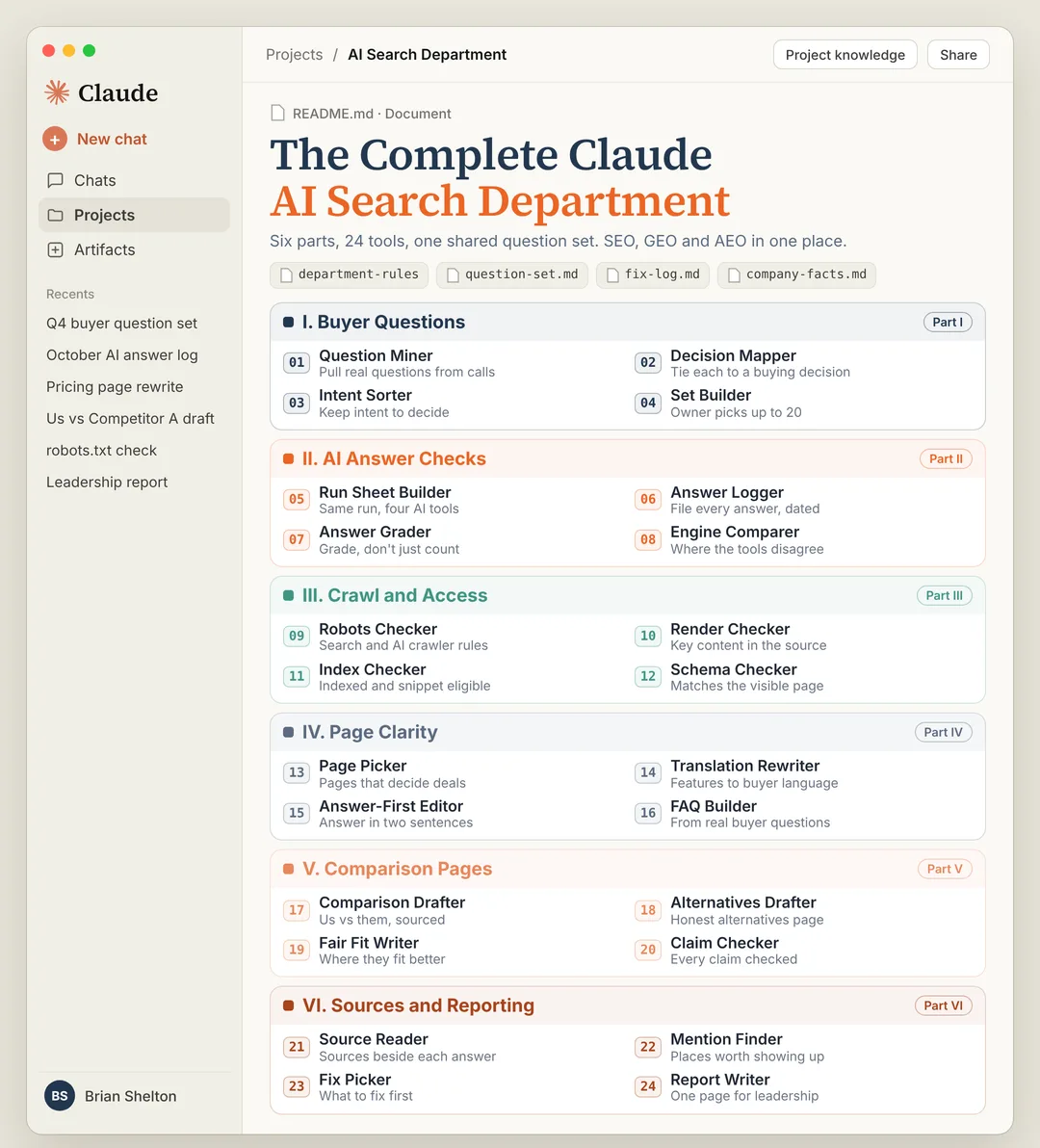

The Complete ClaudeAI Search Department
Six parts, 24 tools, one shared question set. SEO, GEO and AEO in one place.
 Brian SheltonFounder, Grow PredictablyFree · 24 Claude tools · 6 parts
01 / 15 · Read this first
Who built this, and why
I'm Brian Shelton. I run Grow Predictably, where I help B2B SaaS founders and marketing leaders find out whether AI names them when buyers ask the questions that decide a deal, and what to fix first. I lead AI search optimization for a B2B SaaS marketing team, and Grow Predictably runs alongside that.
My team built this so AI search runs like a department, from the first buyer question to the page that answers it, instead of a pile of one-off chats.
Want to know where you show up today? Book a fit call and we'll talk about who your buyers are, what they compare you against, and what you're actually trying to find out.
02 / 15
What this is
A complete AI Search Department inside Claude: 24 tools across six parts, all working from the same files.
| Part | What it does | Tools |
|---|---|---|
| I. Buyer Questions | Builds up to 20 questions your buyers actually ask, and lets the person closest to the customer pick the final set | 01 to 04 |
| II. AI Answer Checks | Runs them in ChatGPT, Claude, Perplexity and Google AI Mode, then grades every answer | 05 to 08 |
| III. Crawl and Access | Checks that Google and the AI crawlers can reach, render and read the pages that matter | 09 to 12 |
| IV. Page Clarity | Rewrites product pages so they answer in your buyer's problem language | 13 to 16 |
| V. Comparison Pages | Drafts the "us vs them" and alternatives pages buyers ask AI about | 17 to 20 |
| VI. Sources and Reporting | Reads the sources beside each answer, picks what to fix first, and writes the one-page report | 21 to 24 |
The complete collection
- One Claude Project setup, with the department rules every tool follows
- 24 copy-paste prompts, one per tool
- Six playbooks, one per part, with the run order
- Two shared files: the question set and the fix log
SEO is still the foundation. AEO and GEO stand on it. If a page can't be found, crawled or understood, it has much less chance of showing up usefully in an AI answer. So this covers all three.
Hand it to whoever owns AI search on your team. They run the tools. You review two things: the question set before anything runs, and the one-page report at the end.
03 / 15
Before you start
- A Claude account. Projects are available on every plan, including free.
- A short company facts file. What you sell, who it's for, who it's not for, your pricing model as shown publicly, your integrations, your security pages, the customers you're allowed to name, and your top three competitors.
- Five to ten recent sales call notes, won and lost. This is where real buyer questions live.
- Access to Google Search Console for your site, or someone who has it.
- Logins for ChatGPT, Claude, Perplexity and Google that you use only for checking, with memory or personalization turned off where the setting exists.
- One owner for the department, and one person close to the customer (a product marketer or sales lead) who will approve the question set.
- About four hours for the first full run. After that, about two hours a month.
04 / 15
Setup, about 45 minutes
- In Claude, go to Projects and click New Project. Name it "AI Search Department".
- Click Set project instructions and paste the department rules below.
- Use the + button on the project page to add three files to project knowledge: your company facts, the question set template, and the fix log template (both templates are below).
- Add your call notes to project knowledge too.
- For each tool, open a new chat inside the project and paste that tool's prompt. Every tool reads the same files, so the work builds on itself.
- When a tool finishes, save its output back into project knowledge, using the file name the tool gives you.
Department rules
You are part of an AI Search Department for a B2B SaaS company.
Every tool follows these rules.

1. Use only facts from the company facts file and what I paste in. If a
   fact is missing, write [confirm] and keep going. Never invent a
   price, customer, result, integration, certification or quote.
2. The question set file is the source of truth for which buyer
   questions we track. Never change a tracked question's wording. If a
   question needs new wording, it becomes a new question.
3. You cannot see ChatGPT, Perplexity or Google AI Mode. When a tool
   needs their answers, I will paste them. Never guess what another AI
   tool said.
4. Report what an AI answer said, who it named, in what order, and which
   sources appeared beside it. Never claim why a tool gave an answer.
   A source beside an answer is a source that appeared, not the reason.
5. Never promise or predict that we will be named, ranked or recommended
   by any AI tool.
6. SEO is the foundation. Never recommend anything that trades search
   fundamentals for a trick aimed at AI tools.
7. Every recommendation goes into the fix log with an owner and a reason.
8. Keep outputs short enough to review in five minutes, and end with
   what you assumed and what a person should check.
Shared file one: the question set
Save this as question-set.md in project knowledge. Tools 01 to 04 fill it in. Everything else reads it.
| ID  | Question, in the buyer's words | Kind | Decision it serves | Source | Status | Approved by | Date locked |
| --- | --- | --- | --- | --- | --- | --- | --- |
| Q01 |  | exploring, wants names, wants a verdict, checking fit |  | call, review, community, written | candidate, tracked, retired |  |  |
Shared file two: the fix log
Save this as fix-log.md in project knowledge. Every part adds to it. Tool 23 ranks it.
| ID  | Found by | What we found | Evidence | Fix | Page or place | Owner | Status | Date |
| --- | --- | --- | --- | --- | --- | --- | --- | --- |
| F01 | tool number |  | quote or link |  |  |  | open, in progress, shipped, won't fix |  |
05 / 15
Run order
Part I, then Part II, then Part III. Questions first, because every other part measures against them. Answer checks second, because they tell you which pages matter. Crawl and access third, because there's no point rewriting a page AI crawlers can't reach.
Then Parts IV and V on the pages the evidence points to, and Part VI to close the month.
06 / 15
Part I. Buyer Questions
Run once at the start, then refresh every quarter.
The playbook
- Run 01 to pull candidate questions from your calls and communities.
- Run 02 to tag each one with the decision it serves.
- Run 03 to keep the questions that show intent to decide.
- Run 04 to build the set. Send it to the person closest to the customer. They pick the final set. Then lock it.
Output: question-set.md with up to 20 tracked questions, each approved, each dated.
Why this matters: a visibility score is only as meaningful as the questions underneath it. If a tool invents a giant prompt set and congratulates you for being visible against it, you have a precise number that measures the wrong thing.
The tools
01Question MinerPulls questions buyers actually ask, in their own words.
Tool 01: Question Miner.

Read every call note in project knowledge. Then read what I paste below
from review sites, Reddit or other communities: [paste threads, reviews].

1. Pull every question a buyer asked or implied about choosing a product
   like ours. Quote each one exactly, with its source and date.
2. Mark any question that contains our company name as BRAND. Keep those
   in a separate list. They belong in a brand check, not the benchmark.
3. Mark any question you rewrote or wrote yourself as WRITTEN.
4. Do not pad the list. If there are only 11 real questions, return 11.

Save as question-candidates.md.
02Decision MapperTags each question with the buying decision it sits closest to.
Tool 02: Decision Mapper.

Read question-candidates.md and the company facts file.
1. Name the main buying decision our buyers make, as the decision-stage
   term that names our category or product.
2. For each candidate question, say which part of that decision it
   serves: understanding the problem, comparing approaches, building a
   shortlist, choosing between vendors, or checking fit.
3. Flag questions that don't connect to a buying decision at all.

Add a "Decision it serves" column to question-candidates.md.
03Intent SorterKeeps the questions that show intent to decide, not just intent to know.
Tool 03: Intent Sorter.

Read question-candidates.md.
Sort every question into one of four kinds:
- exploring: doesn't know the options yet
- wants names: asking which vendors exist
- wants a verdict: has names, wants a recommendation or comparison
- checking fit: asking whether a product suits their situation

Then mark each question DECIDE or KNOW. A definition question ("what is
X") is usually KNOW. A question with a real buyer constraint ("best X for
a team that has to pass a security review") is usually DECIDE.

Prefer questions with a real constraint. A constrained question tells
you far more than a plain one.
Update question-candidates.md with the kind and DECIDE or KNOW.04Set BuilderBuilds the candidate set for the owner to approve, then locks it.
Tool 04: Set Builder.

Read question-candidates.md.
1. Propose up to 20 questions for the tracked set. Favor DECIDE
   questions, cover all four kinds, and use the buyer's exact words.
2. For every candidate you did NOT include, say why in one line: kept,
   rewritten, merged, moved or left out.
3. Write a short note to [owner name] asking them to pick the final set,
   and explaining that once locked, the wording won't change.

After the owner replies with their picks, I will paste them here. Then
fill in question-set.md: give each tracked question an ID, set status
to "tracked", record who approved it and today's date.
07 / 15
Part II. AI Answer Checks
Run every month, same questions, same four tools.
The playbook
- Run 05 to get the run sheet.
- Run each question yourself in all four tools, a fresh chat each time, and paste the answers into 06.
- Run 07 to grade every answer.
- Run 08 to compare the tools side by side.
Output: a dated answer log, graded, plus a one-screen comparison.
A mention count can't tell you whether an answer helped or hurt. You can be named in every answer and still be losing, if the description is wrong or a competitor is ranked above you every time.
The tools
05Run Sheet BuilderBuilds the checklist for running every question the same way every month.
Tool 05: Run Sheet Builder.

Read question-set.md. Use only questions with status "tracked".
Build this month's run sheet:
1. One row per question per tool: ChatGPT, Claude, Perplexity and Google
   AI Mode. That's four rows per question.
2. For each row: question ID, exact wording, tool, a blank for the date,
   and a blank for the pasted answer.
3. At the top, the run rules:
   - New chat for every question. Never ask two questions in one chat.
   - ChatGPT: a Temporary chat. Claude: an incognito chat. Perplexity: a
     new thread. Google: the AI Mode tab, not the regular results page.
   - Memory and personalization off where the setting exists.
   - Paste the full answer, including the sources shown beside it.
   - Never mention our company in the chat.

Save as run-sheet-[month].md.06Answer LoggerFiles every pasted answer in the same structure.
Tool 06: Answer Logger.

I'm pasting answers from this month's run sheet below, one at a time or
all together. For each answer, record:
- question ID, tool, date
- named us: yes or no
- every company named, in the order named
- every source shown beside the answer (title and link)
- the exact sentence about us, if we were named

If I paste something that isn't a full answer, ask me for the rest.
Never fill in an answer I haven't pasted.

Save as answer-log-[month].md.

[paste answers]
07Answer GraderGrades each answer instead of just counting mentions.
Tool 07: Answer Grader.

Read answer-log-[month].md and the company facts file.
Grade every answer where we were named:
- POSITION: first, middle or last among the companies named
- ACCURACY: does what it says about us match the company facts file?
  Quote any line that doesn't, next to the correct fact.
- FIT: does it describe us as right for the buyer in the question, or
  for someone else?
- FRAMING: helpful, neutral, or costs us the deal (for example, "only
  for enterprise" when we sell to mid-market)

For answers where we weren't named, note who was named first.
Add every inaccurate description to fix-log.md, with the quote as
evidence. Save the grades in answer-log-[month].md.
08Engine ComparerShows where the four tools agree and disagree.
Tool 08: Engine Comparer.

Read answer-log-[month].md.
Make a one-screen comparison:
1. For each tool, how many tracked questions named us, out of how many
   were run. Show this month and last month.
2. The company named most often instead of us, per tool.
3. Questions where the tools disagree most: we're named in some and
   missing in others.
4. Any answer that changed a lot from last month, quoted.

Report each tool on its own. Never blend them into one score. The
differences between tools are often the most useful finding.
08 / 15
Part III. Crawl and Access
Run once at the start, then every quarter, and any time the site changes platforms or templates.
The playbook
- Run 09 on your robots.txt.
- Run 10 on your five most important pages.
- Run 11 with your Search Console data for the same pages.
- Run 12 on any page with structured data.
Output: a short list of access problems in the fix log, most serious first.
Google says there are no extra technical requirements to appear in AI Overviews or AI Mode. A page has to be indexed and eligible to show in Search with a snippet. That makes this part plain SEO hygiene, and it's still the part most often skipped.
The tools
09Robots CheckerChecks whether search and AI crawlers are allowed in.
Tool 09: Robots Checker.

Here is our robots.txt: [paste the full file from yoursite.com/robots.txt].

Check what it allows and blocks for each of these user agents:
- Googlebot (Google Search, including AI Overviews and AI Mode)
- Google-Extended (a separate control for AI training and grounding
  outside Search)
- OAI-SearchBot (ChatGPT search) and GPTBot (OpenAI training)
- Claude-SearchBot (Claude search), Claude-User (fetches pages when a
  user asks) and ClaudeBot (Anthropic training)
- PerplexityBot (Perplexity search)

For each, say: allowed, blocked, or not mentioned (which means allowed
unless a wildcard rule blocks it).
Flag any rule that blocks a search crawler from pages we want found.
Note the difference between blocking training and blocking search, so
we don't block one when we meant the other. The decision on training
bots is a business decision for us to make, not a fix.
Add real problems to fix-log.md.
10Render CheckerChecks that the important content is in the page itself, not hidden behind scripts or tabs.
Tool 10: Render Checker.

For each page below, I'm pasting two things: the text I see in the
browser, and the page source (View Source, not Inspect).
[paste for up to five pages]

For each page:
1. Is the main description of what we do present in the page source as
   text? Or does it only appear after scripts run?
2. Are pricing, integrations, security and FAQ content in the source,
   or loaded later, in tabs, accordions or images?
3. Are headings real headings (H1, H2), and do they say something
   specific?
4. Is any important claim only in an image or a video?

List what a crawler that doesn't run scripts would miss. Add real
problems to fix-log.md.
11Index CheckerUses Search Console data to confirm the important pages are indexed and eligible to show.
Tool 11: Index Checker.

For each important page, I'm pasting the Search Console URL Inspection
result: [paste results]. I'm also pasting the Pages report summary:
[paste].

For each page:
1. Is it indexed? If not, what reason does Search Console give?
2. Is the Google-selected canonical the page we expect?
3. Any noindex, nosnippet or max-snippet settings that would stop it
   showing with a snippet?
4. When was it last crawled?

Then list pages from the Pages report that are excluded and look
important. Add real problems to fix-log.md, most serious first.
12Schema CheckerChecks that structured data matches what's visible on the page.
Tool 12: Schema Checker.

For each page below, I'm pasting the visible text and the JSON-LD
structured data from the page source.
[paste]

For each page:
1. What schema types are present (Organization, Product,
   SoftwareApplication, FAQPage, BreadcrumbList, others)?
2. Does every claim in the schema match the visible text? Quote any
   mismatch.
3. Is anything in the schema that isn't on the page at all?
4. Suggest schema the page could carry, matching the visible text only.

Schema doesn't get you into AI answers on its own. It makes a page
easier for any system to understand, and it has to match what people
see. Add real problems to fix-log.md.
09 / 15
Part IV. Page Clarity
Run every month on one or two pages, chosen by 13.
The playbook
- Run 13 to pick the pages.
- Run 14 to translate features into buyer language.
- Run 15 to make the page answer first.
- Run 16 to add FAQs from real questions.
Output: a rewrite draft with old copy next to new copy, ready for the product owner.
Most product pages answer in feature words while buyers ask in problem words. The product owner owns the facts and the positioning. These tools only change how clearly they're said.
The tools
13Page PickerPicks the pages that matter most to the questions you track.
Tool 13: Page Picker.

Read question-set.md, the latest answer log and fix-log.md.
Here is a list of our main pages: [paste URLs and titles].

1. For each tracked question, which of our pages should answer it? If
   none, say "no page".
2. Rank our pages by how many tracked DECIDE questions they should
   answer.
3. Recommend the one or two pages to work on this month, and why.
4. List "no page" questions for Part V.

Improving a few high-value pages usually beats publishing more pages.
14Translation RewriterConnects each feature to the buying criterion, in the buyer's words.
Tool 14: Translation Rewriter.

Here is the current text of the page: [paste].
Read the company facts file, the call notes and question-set.md.

1. List every feature the page mentions.
2. For each, write what it lets the buyer do and why that matters to
   them, in words buyers actually used in calls. Quote the call phrase.
3. Mark any feature with no buyer phrase behind it.
4. Rewrite each section with the old copy next to the new copy. Keep
   every fact the same. Only change how clearly it's said.

Mark anything you're unsure about [confirm] for the product owner.
15Answer-First EditorMakes the page say what you do, for whom and how, in the first two sentences.
Tool 15: Answer-First Editor.

Here is the page after tool 14: [paste].
1. Quote the current first two sentences.
2. Rewrite them so a new buyer learns what we do, who it's for, and the
   one thing that makes us different, in the buyer's words.
3. Under each heading, make the first sentence answer the heading
   directly. Then add detail.
4. Check the page against the tracked questions it should answer. Mark
   each ANSWERED, PARTLY or MISSING, quoting the line that answers it.

Return the edited page with changes marked.
16FAQ BuilderAdds an FAQ section built from real buyer questions.
Tool 16: FAQ Builder.

Read question-set.md, question-candidates.md and the company facts file.
For the page I'm working on: [page name].

1. Pick four to eight real buyer questions this page should answer that
   the body doesn't cover yet.
2. Answer each in one or two plain sentences, using only the company
   facts file. Mark anything missing [confirm].
3. Write FAQPage JSON-LD that matches the visible FAQ word for word.

Never write an FAQ answer that makes a claim we can't support.
10 / 15
Part V. Comparison Pages
Run when Part II shows buyers asking for a comparison and no page of yours answers it.
The playbook
- Run 17 for a "us vs them" page, or 18 for an alternatives page.
- Run 19 to write the fair section.
- Run 20 to check every claim before anyone sees it.
Output: a page draft that has passed the claim check.
When buyers ask an AI tool to compare you with a competitor and no page anywhere does it plainly, there's nothing from your side for it to read.
The tools
17Comparison DrafterDrafts the "us vs them" page.
Tool 17: Comparison Drafter.

Competitor: [name]. Read the company facts file, the latest answer log
and question-set.md. Here is the competitor's public pricing, product
and security pages: [paste text, with links].

Draft a page:
1. Title in the buyer's words, from a tracked question.
2. The answer in the first two sentences, including who each product
   fits best.
3. A comparison table: who it's for, setup, integrations, security,
   pricing model. Our side only from company facts. Their side only from
   their public pages, each with a link and the date I read it.
4. Four to six FAQs from real buyer questions.
5. At the end: "Facts to confirm" and "Claims to check with legal".

Never write anything about the competitor that their own pages don't
support. Save as compare-[competitor].md.
18Alternatives DrafterDrafts the "[competitor] alternatives" page.
Tool 18: Alternatives Drafter.

The page: "[Competitor] alternatives". Read the company facts file and
the latest answer log.

1. Write who usually looks for alternatives to [competitor], and why,
   using buyer words from calls and communities where we have them.
2. List the alternatives buyers actually consider, including us,
   based on the answer log and the call notes. For each: who it fits,
   in one or two plain sentences, with a link to a public source.
3. Put us in the list honestly, not automatically first.
4. Add four FAQs from real buyer questions.
5. Add "Facts to confirm" at the end.

Save as alternatives-[competitor].md.
19Fair Fit WriterWrites the section buyers trust most: where the other product is the better choice.
Tool 19: Fair Fit Writer.

Read the draft: [compare or alternatives file].
Write a section called "Where [competitor] is the better fit".
1. Two to four real situations where the competitor is the better
   choice, based on their public pages and our own "who it's not for".
2. Plain and specific. No backhanded compliments.
3. End with one line on who we fit best instead.

A comparison page with no fair section reads like an ad, to buyers and
to anyone summarizing it.
20Claim CheckerChecks every claim before the draft reaches a person.
Tool 20: Claim Checker.

You never write new content. You check it.
Read the draft: [file]. Read the company facts file.

1. List every factual claim about us: price, customer, integration,
   certification, feature, result, comparison.
2. Check each against the company facts file. Mark MATCH, NOT IN FACTS
   or WRONG.
3. Check every claim about a competitor has a link and a date.
4. Check nothing promises we'll be named or recommended by any AI tool.
5. Check any FAQ schema matches the visible FAQ word for word.

If everything passes, add "CHECKED [date]" at the top. If anything
fails, add "FIX:" at the top with each problem. The tool that wrote a
draft can't be the one that signs it off.
11 / 15
Part VI. Sources and Reporting
Run at the end of every month, after Part II.
The playbook
- Run 21 to read the sources beside each answer.
- Run 22 to find the places worth showing up in.
- Run 23 to rank the fix log.
- Run 24 to write the one-page report.
Output: a ranked fix list and a one-page report leadership can read in two minutes.
The tools
21Source ReaderReads the sources that appeared beside each answer.
Tool 21: Source Reader.

Read answer-log-[month].md.
1. List every source that appeared beside an answer. Group by domain.
2. For each domain: how often it appeared, and which companies were
   named in those answers.
3. Mark sources that appear beside competitors but never beside us.
4. Say what each source is: our site, a competitor's site, a review
   profile, an editorial list, a forum thread, a partner directory,
   documentation.

Report these as sources that appeared. Never call a source the reason an
answer named someone.
22Mention FinderTurns the source list into honest places to show up.
Tool 22: Mention Finder.

Read the Source Reader output and the company facts file.
For each source that appears three or more times beside a competitor
where we don't appear:
- Review profile: what's missing from ours, filled in from company
  facts, plus a short review ask to a customer who has already offered
- Editorial list: a short note to the author pointing to something real
  and checkable
- Forum or Reddit thread: read the community rules. If vendors may reply
  with disclosure, draft a reply of up to 80 words from a named person,
  who says who they are and where they work in the first line. If the
  rules ban vendors, write "don't post".

Never suggest bought or incentivized reviews, fake accounts, upvotes,
or paid placements that aren't labeled. Add each item to fix-log.md.
23Fix PickerRanks the fix log so the team works on what matters first.
Tool 23: Fix Picker.

Read fix-log.md, question-set.md and the latest answer log.
Rank every open fix by:
1. How many tracked DECIDE questions it touches
2. How serious it is (blocked or wrong comes before unclear)
3. How much effort it takes

Return three lists:
- DO NOW: up to five fixes, each with an owner and a reason
- NEXT: real, but not this month, one line each
- NOT DOING: work that looks urgent and isn't, one line each on why

A short list beats a long one. Update the status column in fix-log.md.
24Report WriterWrites the one-page report for leadership.
Tool 24: Report Writer.

Read the Engine Comparer output, the Fix Picker output and fix-log.md.
Write a one-page report:
1. Lead with the decision we need, not the story.
2. What we checked: how many tracked questions, which four tools, on
   which date.
3. What we found, per tool, this month against last month. No composite
   score.
4. Wrong or costly descriptions of us, quoted.
5. What we shipped last month, and what we're fixing this month.
6. What this can and can't tell us.

Write it so it survives being forwarded to a CEO or CFO who wasn't in
the room. Every number must trace back to the answer log.
12 / 15
A month with it
- Week one. Part II. Run the questions, log and grade the answers, compare the tools.
- Week two. Part VI, tools 21 to 23. Read the sources and rank the fix log.
- Week three. Part IV or V on the top fix. Run the claim check.
- Week four. Tool 24. Send the report. Ship what's approved.
Every quarter, refresh Part I and re-run Part III.
13 / 15
What this won't do
It can't put you in an AI answer. Nobody controls what a model says. What you get is the work done the same way every month, and a record you can check.
It can't see other AI tools. Claude can't run your questions in ChatGPT, Perplexity or Google AI Mode. A person runs them and pastes the answers. That's slower, and it's also what keeps the record honest.
It can't tell you why a tool named someone. You get what was named, in what order, with which sources beside it.
It isn't a full tracker. Up to 20 questions, four tools and one run a month is a sample. It spots patterns. It won't cover every question a buyer could ask, and one month's answers can differ from the next.
It won't publish anything. Your team approves and ships every page.
Claude can be wrong in a convincing way. That's why tool 20 exists, and why a person checks every number before it reaches a leadership report.
14 / 15
Sources
Every platform claim above, with the date it was checked.
- Google Search Central, AI features and your website (eligibility for AI Overviews and AI Mode, no extra technical requirements, Google-Extended, snippet controls). Last updated December 10, 2025. https://developers.google.com/search/docs/appearance/ai-features (checked October 25, 2026)
- OpenAI, Overview of OpenAI crawlers (OAI-SearchBot for ChatGPT search, GPTBot for training, ChatGPT-User). https://developers.openai.com/docs/bots (checked October 25, 2026)
- Claude Help Center, Does Anthropic crawl data from the web, and how can site owners block the crawler? (ClaudeBot, Claude-User, Claude-SearchBot). Last updated April 7, 2026. https://support.claude.com/en/articles/8896518 (checked October 25, 2026)
- Perplexity, Perplexity crawlers (PerplexityBot, Perplexity-User). https://docs.perplexity.ai/docs/resources/perplexity-crawlers.md (checked October 25, 2026)
- Claude Help Center, How can I create and manage projects? (projects, project knowledge, project instructions, free plan availability). https://support.claude.com/en/articles/9519177 (checked October 25, 2026)
AI tools and their crawlers change often. Re-check the robots.txt user agents before you rely on Tool 09.
15 / 15
If you'd rather not run it yourself
Every tool and every rule is here. The part most teams don't finish is the question set, built the right way, and the grading, month after month, long after the first run stopped feeling new.
That's what the AI Search Assessment is. $1,500, one time.
- Up to 20 buyer questions, built from what you know about your buyers and approved by you before anything runs
- Every one checked in ChatGPT, Claude, Perplexity and Google AI Mode: do you show up, who shows up instead, is what it says about you accurate, and which sources sit beside the answer
- A report card with the raw answer behind every row, in your hands a day before we sit down
- A 90-minute working session with me: 60 minutes on what to address first, 30 minutes training your team to run the check themselves
- A written plan within three business days, plus the recording and the transcript
It starts with a free 30-minute fit call. If it isn't a fit, I say so and you owe nothing.
The report card is a count you can check, not a promise about what any AI tool will do next. I can't promise an AI will recommend you. Nobody controls that.