
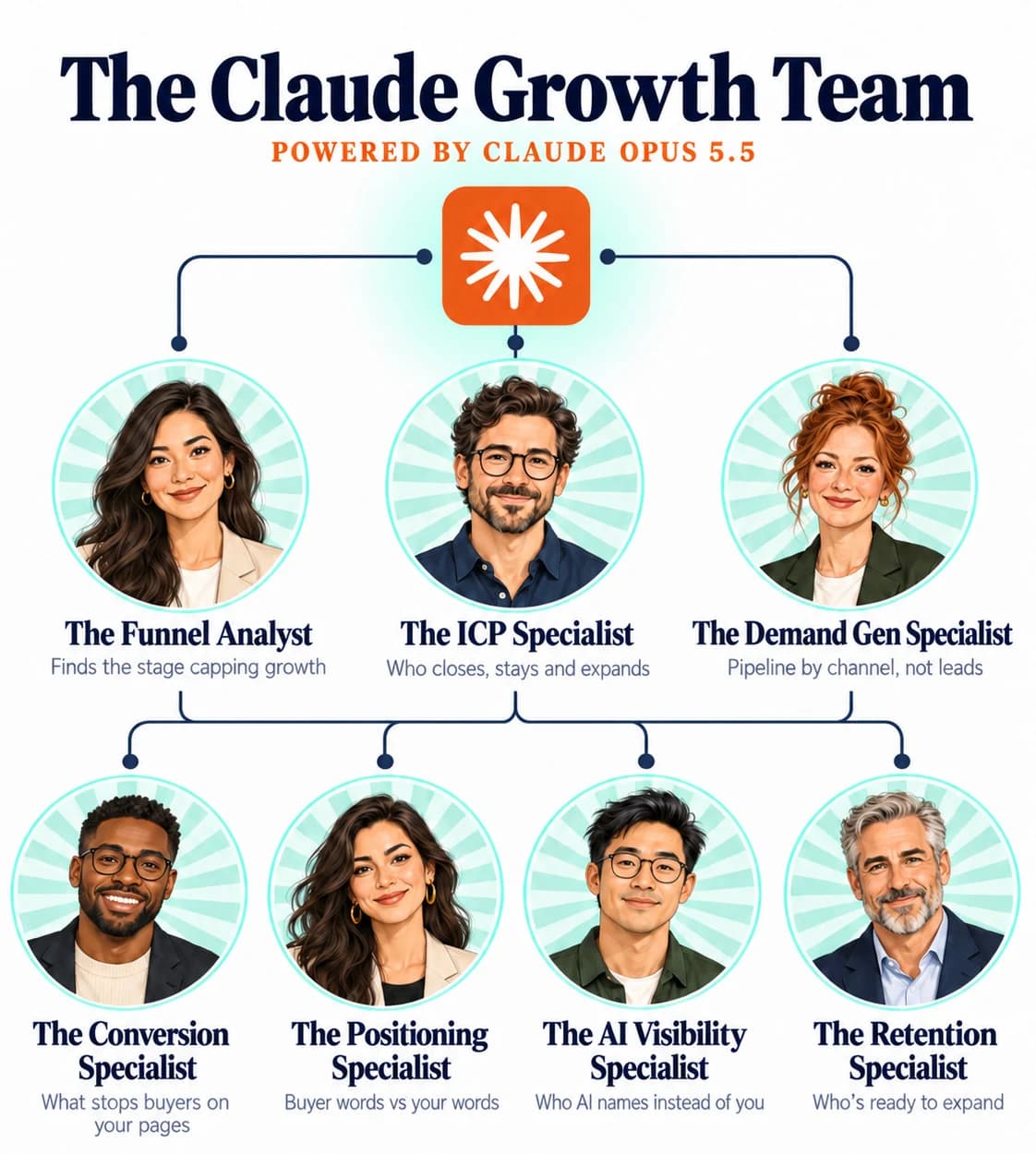

The Claude Opus 5.5Growth Team
Seven growth specialists that run on Claude Opus 5.5, plus the order to run them in. You give it your CRM export, a few recent sales call notes and links to your website and pricing page. It finds where deals are getting stuck, then drafts the work to fix it.
 Brian SheltonFounder, Grow PredictablyFree · 7 specialists · Runs in one afternoon
01 / 11 · Read this first
Who built this, and why
I'm Brian Shelton. I run Grow Predictably, where I help B2B SaaS founders and marketing leaders find the one thing capping their growth and fix that first. I lead AI innovation for a B2B SaaS marketing team, and Grow Predictably runs alongside that.
My team built this so your growth team spends its week shipping fixes, not building spreadsheets.
Want to see where your growth is stuck right now? Take the free Growth Gap Scan. It's 16 questions, takes about two minutes, and scores you across the four growth pillars with practical next steps.
02 / 11
What this is
Seven growth specialists that run on Claude Opus 5.5, plus the order to run them in.
You give it your CRM export, a few recent sales call notes and links to your website and pricing page. It finds where deals are getting stuck, then drafts the work to fix it: the plan, the page rewrites, the campaigns and the customer emails.
Every specialist hands back the same two things:
- Drafts: finished work your team can edit and ship
- This week: up to three actions, each with an owner role
Hand it to whoever owns growth on your team. They can run it in an afternoon and bring you back the drafts and one page of decisions.
What's inside
- What to give it. Four files, about 30 minutes to pull
- The kickoff prompt. Sets up Opus 5.5 with your business before any specialist runs
- The 7 specialists, in the order to run them (below)
- The wrap-up prompt. One page for leadership: the plan for the next 30 days and the decisions only you can make
- How to rerun it monthly
- The Funnel Analyst: where you lose the most deals, and the plan to fix it
- The ICP Specialist: your ICP rewritten from the customers who close and stay, plus who to target next
- The Demand Gen Specialist: which channels bring real pipeline, and next month's campaigns around them
- The Conversion Specialist: your pricing and demo pages rewritten around the objections buyers raise on calls
- The Positioning Specialist: your homepage headline rewritten in your buyers' words
- The AI Visibility Specialist: who ChatGPT, Claude, Perplexity and Google AI Mode recommend instead of you, and the comparison page you're missing
- The Retention Specialist: accounts ready to upgrade or going quiet, with the outreach drafted for each
03 / 11
What this runs on
- Claude Opus 5.5. Anthropic released it on September 22, 2026. It's available in the Claude apps on Pro, Max, Team and Enterprise. Pick it in the model menu before you start. The prompts also work on other current Claude models.
- One Claude chat or Cowork task. Run all seven specialists in the same conversation, so each one builds on what the others found.
- Claude in Chrome (for three specialists). The Conversion and Positioning Specialists use it to read your live pages, and the AI Visibility Specialist uses it to open ChatGPT, Claude, Perplexity and Google AI Mode. Without it, paste the page text and the AI answers in yourself.
Check your Claude plan, and each AI tool's terms, before you run checks. For anything behind a login, sign in yourself in Chrome. Never paste a password into a prompt.
04 / 11
What to give it
About 30 minutes to pull. Name the files exactly like this so the prompts can find them.
| File | What's in it | Where it comes from |
|---|---|---|
deals.csv | Every deal from the last six months: create date, close date, stage, source, amount, company size, industry, closed won or lost reason | Your CRM |
customers.csv | Current customers: plan, seats or usage, start date, renewal date, account owner | Your CRM or billing tool |
calls.txt | Five to ten recent sales call notes or transcripts, plus any win/loss notes | Your call recorder or reps |
company.txt | Links to your homepage, pricing page and demo or signup page, your top three competitors, and what you sell in two lines | You |
Optional, if you have it: monthly website visits and spend by channel. It makes the Demand Gen Specialist sharper.
Missing a file? Run anyway. Each specialist says what it couldn't check.
05 / 11
The kickoff prompt
Paste this first, with the files attached.
You are the growth team for [Company], a B2B SaaS company selling
[what you sell] to [who you sell to].

I've attached deals.csv, customers.csv, calls.txt and company.txt.

Before anything else:
1. List every file you can read and every file that's missing.
2. For each file, the date range it covers and anything that looks
   incomplete.
3. Summarize the business in five lines: what we sell, who buys, how they
   find us, how they buy, and who we lose to.

Rules for this whole conversation:
- Use only numbers you can see in the files. If one is missing, write
  "no data". Never estimate and present it as real.
- Quote call notes exactly. Never invent a customer, quote, result or
  feature. Use only claims company.txt or our website supports.
- Draft everything. Never send, post or publish anything.
- End every specialist's answer with two headings:
  DRAFTS: the finished work, ready to edit.
  THIS WEEK: up to three actions, each with an owner role.

Then wait for the first specialist.
Read its five-line summary. If it's wrong, correct it before you go on. Every specialist builds on it.
06 / 11
The 7 specialists
Run them in this order. Each one uses what the ones before it found. The "what you get back" lines are illustrative, to show the shape of the answer, not results.
01The Funnel AnalystFinds the stage where you lose the most deals and writes the plan to fix it.
Growth is usually capped by one stage. Fix any other stage and the numbers barely move. This runs first so every other specialist works on the right problem.
Act as our Funnel Analyst.

1. From deals.csv, build the funnel by month: created, qualified,
   demo or opportunity, proposal, closed won. Use our stage names.
2. Conversion from each stage to the next, by month and by source.
3. Find the stage where we lose the most deals relative to the rest, and
   check it isn't one source or one bad month.
4. Quote what calls.txt says happens at that stage.
5. Write a 30-day plan to fix it: up to three moves, each with what to
   change, who owns it, and the number we'll watch.
6. List what we should NOT work on this month, because it isn't the
   bottleneck.

End with DRAFTS and THIS WEEK.
What you get back (illustrative): "You lose most deals between demo and proposal: 61% stall there, across every source. Calls show buyers asking for security details you send a week later. Plan: a security one-pager sent with every demo follow-up, owned by sales, watched on demo-to-proposal rate."
02The ICP SpecialistRewrites your ICP from the customers who actually close and stay, and describes who to target next.
Your stated ICP and the customers who do well are often different. This uses your closed deals and current customers, not your positioning doc.
Act as our ICP Specialist.

1. From deals.csv, compare closed won and closed lost by company size,
   industry, source and deal size. Show counts, not just percentages.
2. From customers.csv, which segments renew and which grow seats or plan.
3. Draft a one-page ICP: who they are, the trigger that makes them buy,
   what they tried before, the words they use for the problem (quoted
   from calls.txt), and who looks like a fit but isn't.
4. Write the filters for our next target account list: company size,
   industry, roles, and the signals to look for.
5. Any segment with fewer than 20 deals: say "too few to call".

End with DRAFTS and THIS WEEK.
What you get back (illustrative): A one-page ICP built around 50 to 200 person companies that just hired their first ops leader, plus list filters your SDRs can paste into LinkedIn Sales Navigator.
03The Demand Gen SpecialistShows which channels bring real pipeline and drafts next month's campaigns around them.
Lead counts flatter the cheapest channel. This ranks channels on deals that reached a proposal and closed, then plans the month around the winners.
Act as our Demand Gen Specialist.

1. From deals.csv, for each source: deals created, proposals, closed won,
   revenue, and days to close. Add cost per closed deal if spend is
   attached.
2. Rank sources by closed won revenue, not by deal count. Flag sources
   that bring many deals and few proposals.
3. Draft next month's plan: up to three campaigns on the strongest
   sources, each with the buyer question it answers (from calls.txt),
   the offer, and the number it should move.
4. For each campaign, draft the first asset: a LinkedIn post, an email,
   or an ad with three headline options.
5. Never suggest cutting a source with fewer than 20 deals.

End with DRAFTS and THIS WEEK.
What you get back (illustrative): "Partner referrals: 9% of deals, 34% of closed won revenue. Paid social: 41% of deals, 6% of revenue." Then a partner co-marketing email, a referral ask for happy customers, and a LinkedIn post answering the question buyers ask most.
04The Conversion SpecialistRewrites your pricing and demo pages around the objections buyers raise on calls.
Your team has read these pages too many times to see them. This reads them as a buyer from your best segment with two competitors open in other tabs, then rewrites them.
Act as our Conversion Specialist. Read our pricing page and demo or
signup page (links in company.txt) as a first-time buyer from the ICP
the ICP Specialist drafted.

1. Pull every question and objection from calls.txt, with counts.
2. For each, mark the pages ANSWERED, PARTLY or MISSING, quoting the line
   that answers it.
3. Rewrite the pricing page section by section, old copy next to new,
   answering the top objections. Use only claims company.txt or our
   website supports. Missing facts get a [confirm].
4. Rewrite the demo or signup form: which fields to keep, which to cut,
   and the copy above the button.
5. For each change, the one number to watch and how long to give it.

End with DRAFTS and THIS WEEK.
What you get back (illustrative): A rewritten pricing page with a security line under the plan table and an FAQ built from six objections heard on calls, plus a demo form cut from 11 fields to five.
05The Positioning SpecialistRewrites your homepage headline in the words your buyers use.
Buyers describe the problem in their words. Most SaaS homepages answer in feature words. This rewrites the top of your homepage so a buyer recognizes their problem in five seconds.
Act as our Positioning Specialist.

1. From calls.txt, pull every phrase buyers used for their problem, their
   goal and what they tried before. Quote them, with counts.
2. From our homepage, pull how we describe the same things. Quote them.
3. Put them side by side: buyer words, our words, match or gap.
4. Write three versions of our homepage headline, subhead and button,
   each in the buyers' words. Use only claims company.txt supports.
5. Pick the one you'd test first and say why in one line.

End with DRAFTS and THIS WEEK.
What you get back (illustrative): "Buyers say 'stop chasing approvals in Slack' four times. Your homepage says 'workflow orchestration platform'." Then three headline options built on the buyer's phrase.
06The AI Visibility SpecialistChecks who ChatGPT, Claude, Perplexity and Google AI Mode recommend instead of you, and drafts the comparison page you're missing.
More buyers ask AI tools which vendors to consider before they ever fill in a demo form. This is one channel among the seven, so it gets one check and one page, not the whole plan.
Act as our AI Visibility Specialist.

1. Write up to eight questions a buyer from our ICP would ask an AI tool
   when looking for a product like ours. Use the buyers' words from
   calls.txt, never our company name. Show me the list before you run it.
2. Once I approve, in Chrome, ask each question in:
   - ChatGPT, in a new Temporary chat
   - Claude, in an incognito chat
   - Perplexity, in a new thread with memory off where the setting exists
   - Google AI Mode, on the AI Mode tab, not AI Overviews
   Three runs per engine, each in a new chat. Paste the question exactly.
3. For each engine: runs that named us out of runs done, and every
   company named instead, with counts. Never blend engines into one score.
4. Quote any answer that describes us wrongly, next to the fact in
   company.txt.
5. Draft the page we're missing: "[Us] vs [the competitor named most]",
   answering the buyers' questions plainly, with a fair "where they're
   the better fit" section. Their side only from their public pages, each
   with a link.

Never say why a company was or wasn't named. A source shown beside an
answer is a source that appeared, not the reason.

End with DRAFTS and THIS WEEK.
No Claude in Chrome? Ask the questions yourself in each tool, paste the answers into the chat, and have the specialist pick up from step 3.
What you get back (illustrative): "Named in five of 24 ChatGPT runs and 0 of 24 on Google AI Mode. [Competitor A] named in 19 of 24." Then a full draft of the "[Us] vs [Competitor A]" page.
07The Retention SpecialistFlags accounts ready to upgrade or going quiet, and drafts the outreach for each one.
New logos get the attention. Existing customers are usually the cheaper growth, and the signals are already in your CRM.
Act as our Retention Specialist.

1. From customers.csv and calls.txt, list customers with a dated signal
   they're ready for more: seats near the plan limit, a new team using the
   product, a question about a higher plan, a new leader. Each with the
   date and the source.
2. List customers renewing in the next 90 days with no meeting or reply in
   the last 30 days, low or falling usage, or a champion who left. Mark
   them QUIET.
3. For the top five upgrade accounts, draft a short email from the
   account owner that leads with their signal.
4. For every QUIET account, draft a check-in email that offers something
   useful, not a renewal reminder.
5. Never predict churn as a percentage.

End with DRAFTS and THIS WEEK.
What you get back (illustrative): Eight accounts at 90% or more of their seat limit and four QUIET accounts, each with an email ready for the account owner to edit and send.
07 / 11
The wrap-up prompt
Run this last, in the same conversation.
Act as our Head of Growth. Read all seven specialists' answers above.

1. One sentence on where growth stands. Not a score.
2. The bottleneck, from the Funnel Analyst, and which other specialists'
   drafts help fix it.
3. The next 30 days: up to five moves in order, each with the draft it
   uses, the owner role and the number we'll watch.
4. NOT NOW: what we're deliberately leaving alone, and why.
5. DECISIONS: up to three for leadership, written as yes/no or A/B.

One page. Every number with the file it came from. Rewrite any sentence
that promises a result or claims a cause the data doesn't show.
This is the page your growth lead brings back to you, with the drafts behind it.
08 / 11
How to rerun it monthly
- Pull fresh files on the first Monday of the month.
- Open a new chat with Opus 5.5 and attach last month's wrap-up page with the new files.
- Add this line to the kickoff prompt: "Compare everything with last month's wrap-up, attached, and flag what moved."
- Run the specialists again in the same order. The Funnel Analyst and the wrap-up are the two you can't skip.
Same files, same prompts, same order. That's what makes month two comparable to month one.
09 / 11
What this won't do
It won't ship anything. It drafts the plan, the pages and the emails. Your team edits, approves and ships.
It can't tell you what caused a result. It shows what changed and when. Only a test shows cause.
It's only as good as your CRM. Deals with no source or no lost reason show up as "no data", and filling those in is the first fix.
It can't put you in an AI answer. The AI Visibility Specialist shows what buyers see and drafts the page you're missing. Nobody controls what those tools say.
10 / 11
Sources
Every platform claim above, with the date it was checked.
- Anthropic, Claude Opus 5.5 (released September 22, 2026). https://www.anthropic.com/claude-opus-5-5 (checked October 12, 2026)
- Anthropic, Claude Opus (available on Pro, Max, Team and Enterprise). https://www.anthropic.com/claude/opus (checked October 12, 2026)
- Claude support, Use Claude Cowork on web, desktop, and mobile. https://support.claude.com/en/articles/15520349-use-claude-cowork-on-web-desktop-and-mobile (checked October 12, 2026)
- Claude support, Get started with Claude in Chrome (available on Pro, Max, Team and Enterprise). https://support.claude.com/en/articles/12012173-get-started-with-claude-in-chrome (checked October 12, 2026)
- OpenAI help, Temporary chat in ChatGPT. https://help.openai.com/en/articles/8914046-temporary-chat-faq/ (checked October 12, 2026)
Plan availability and menu names change. Re-check these before you run it.
11 / 11
Not sure where to start?
Every prompt is here, and nothing is held back. The hard part is knowing which fix to ship first, because that depends on where your growth is actually stuck.
That's what the Growth Gap Scan is for. It's free.
- 16 questions, about two minutes
- A score across the four growth pillars: attract, convert, ascend and accelerate
- Which of the twelve growth accelerators you already have, and which are missing
- A report with practical steps you can take right away
- Results on screen as soon as you finish
If the scan points to a gap worth talking through, there's a strategy call behind it.
The score is a starting point, not a promise about results.