
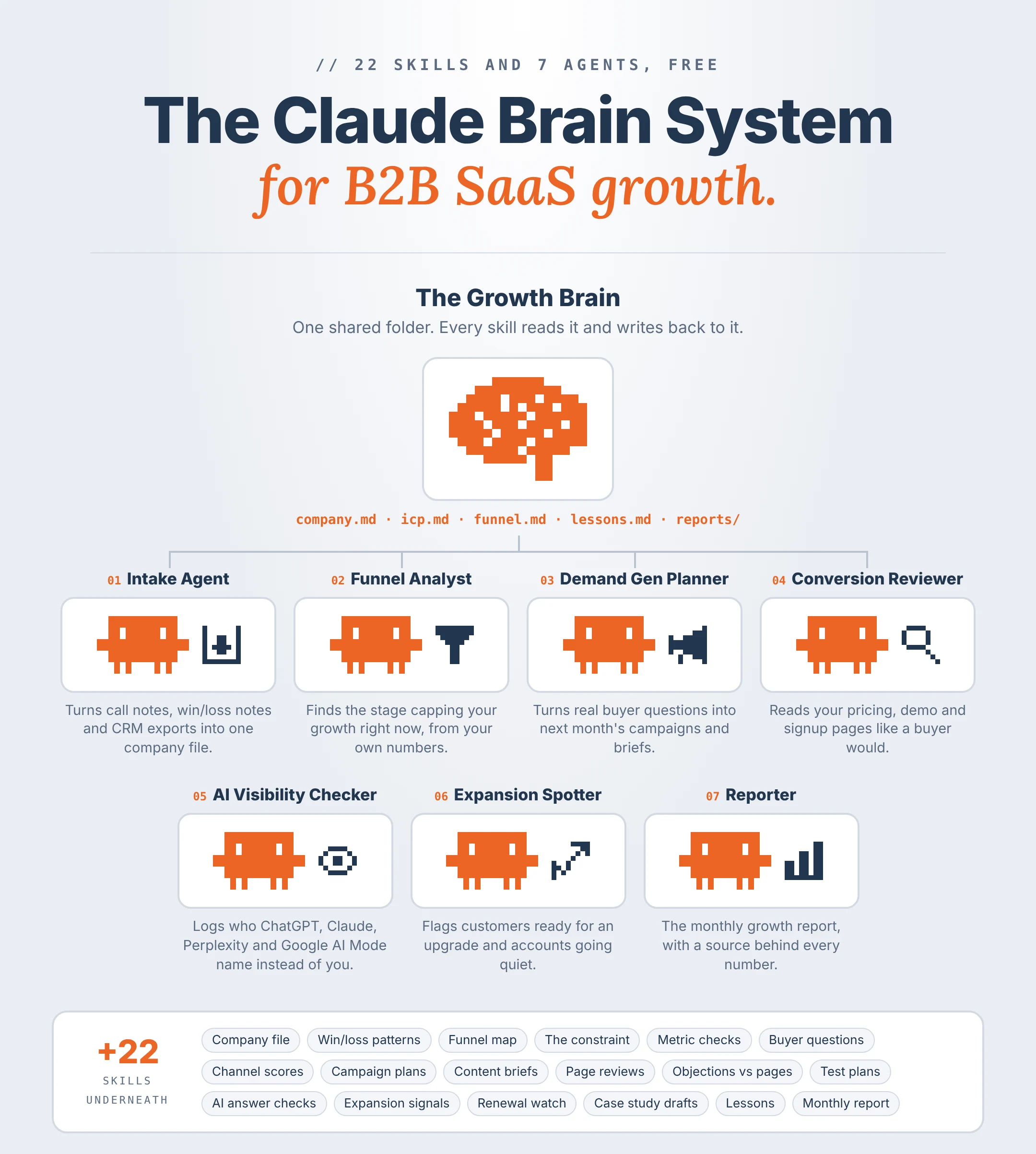

The Claude Brain Systemfor B2B SaaS growth
One folder that holds what Claude needs to know about your business, 22 skills that do the digging, and 7 agents that run those skills on a schedule. Nobody on your growth team has to explain the business to Claude again.
 Brian SheltonFounder, Grow PredictablyFree · 22 Claude Skills · 7 agents
01 / 15 · Read this first
Who built this, and why
I'm Brian Shelton. I run Grow Predictably, where I help B2B SaaS founders and marketing leaders find the one thing capping their growth and fix that first. I lead AI innovation for a B2B SaaS marketing team, and Grow Predictably runs alongside that.
My team built this so nobody on a growth team has to explain the business to Claude again.
Want to see where your growth is stuck right now? Take the free Growth Gap Scan. It's 16 questions, takes about two minutes, and scores you across the four growth pillars with practical next steps.
02 / 15
What this is
One folder that holds what Claude needs to know about your business, 22 skills that do the digging, and 7 agents that run those skills on a schedule.
It replaces the manual work that eats a growth team's week:
- Re-explaining your ICP, offer and funnel every time someone opens a new chat
- Pulling CRM and analytics exports into a spreadsheet to find where deals stall
- Reading call notes and win/loss notes by hand to find what buyers keep asking
- Reviewing your own pricing and demo pages and guessing what stops people
- Checking what ChatGPT, Claude, Perplexity and Google AI Mode say when buyers ask for a tool like yours
- Building the monthly growth report from five tabs and a Slack thread
Built for a leader to hand to whoever owns growth on the team. They set it up and run it. You get the weekly constraint, the fix list and a one-page monthly report.
What's inside
- The growth brain folder. One folder, twelve fixed files, plus campaign plans, page reviews and reports
- The house rules. The file every skill reads first
- The 7 agents, each with its skills and its task prompt (below)
- All 22 skills, every
SKILL.mdin full - The two-week build order. Run the skills by hand first, then switch agents on
- Intake Agent: call notes, win/loss notes and CRM exports into one company file
- Funnel Analyst: the stage capping growth right now, from your own numbers
- Demand Gen Planner: buyer questions into next month's campaigns and content briefs
- Conversion Reviewer: what stops buyers on your pricing, demo and signup pages
- AI Visibility Checker: who gets named instead of you in ChatGPT, Claude, Perplexity and Google AI Mode
- Expansion Spotter: customers ready for an upgrade and accounts going quiet before renewal
- Reporter: the monthly growth report, with a source behind every number
03 / 15
What this runs on
No new platform and no code. It's Claude, working from one folder.
- Claude Cowork. Runs tasks for you, reaches the folders you connect through the Claude desktop app, and runs scheduled tasks. The folder is the memory. The scheduled tasks are the agents.
- Claude Skills. A skill is a folder with a
SKILL.mdfile: a name and a short description at the top, then the instructions. Claude uses the description to decide when to load it. - Claude in Chrome. Lets Claude use your Chrome browser. The Conversion Reviewer uses it to read your pages, and the AI Visibility Checker uses it to open ChatGPT, Claude, Perplexity and Google AI Mode.
- Connectors. Google Drive, Google Calendar and Slack connect in Claude's settings. If your CRM has a Claude connector, connect it. If not, a weekly CSV export works fine.
- A paid Claude plan. Pro, Max, Team or Enterprise.
Where it runs. Since October 6, 2026, new Cowork tasks on Pro and Max run in the cloud. Your folder stays on your computer, and Claude reaches it through the desktop app only while the app is open. Any agent that reads the folder or drives Chrome needs the desktop app open at run time. If the computer is off, Claude runs the task when you're back and tells you it was late.
For anything behind a login, sign in yourself in Chrome. Never paste a password into a prompt or a skill file.
04 / 15
Before you start
About an hour.
- Install the Claude desktop app and sign in with a paid plan.
- Make a folder named growth-brain on a computer that's on during working hours.
- Inside it, make the folders _system, _imports, campaigns, pages, reports and accounts. Inside _imports, make crm, analytics and notes.
- In Cowork, connect the growth-brain folder.
- In Claude's settings, turn on code execution. Skills need it.
- Connect Google Drive and Google Calendar. Add Slack if your team lives there.
- Install Claude in Chrome.
- Export the last two quarters from your CRM (deals with stage, source, amount, dates, owner, closed won or lost reason) into _imports/crm.
- Export the last two quarters from your analytics tool (visits, signups or demo requests, by channel and by month) into _imports/analytics.
- Drop your positioning doc, pricing page link, five to ten recent call notes and any win/loss notes into _imports/notes.
- Decide who owns this. One name.
05 / 15
The growth brain folder
Every skill and every agent reads and writes here. If it isn't in the folder, the system doesn't know it.
growth-brain/
  _system/
    rules.md          the house rules every skill reads first
    team.md           who owns growth, who approves pages, who gets the report
    agents.md         every agent, its schedule, its last run
  _imports/
    crm/              CRM exports
    analytics/        analytics exports
    notes/            call notes, win/loss notes, positioning, anything pasted in
  company.md
  icp.md
  funnel.md
  constraint.md
  buyer-questions.md
  channels.md
  pages.md
  ai-visibility.md
  accounts.md
  tests.md
  lessons.md
  fixes.md
  campaigns/          monthly campaign plans and content briefs
  pages/              page reviews and test plans
  reports/            monthly reports and readouts
accounts/ case study drafts and expansion notes| File | What's in it |
|---|---|
company.md | Product, category, pricing model, who it's for, competitors, the differences buyers care about in their words |
icp.md | Who closes fastest, stays longest and expands, from your own CRM, plus who's a bad fit |
funnel.md | Every funnel stage with its monthly numbers and conversion rate, by channel |
constraint.md | The one stage capping growth right now, the evidence, and the date it was named |
buyer-questions.md | What buyers ask on calls and in notes, in their words, with the source |
channels.md | Every channel with leads, pipeline, closed won and cost, side by side |
pages.md | Your key pages and what each review found |
ai-visibility.md | Every AI answer check: question, engine, who was named, sources shown |
accounts.md | Customers with expansion or renewal signals, each with a date and a source |
tests.md | Every test: what changed, the dates, the result, and whether it held |
lessons.md | Standing rules from lost deals and failed tests |
fixes.md | The ranked fix list. Each item has a status (DRAFTED, APPROVED, LIVE, CHECKED) and a date |
Three rules hold the whole thing together:
- Read first. Every skill reads
_system/rules.mdandcompany.mdbefore anything else. - Date and source on every fact. A number nobody can trace is a number nobody should act on.
- Nothing goes live from here. No skill publishes, posts, sends or changes a live page. A person moves drafts out.
06 / 15
How to add a skill
Same steps for all 22.
- Make a folder named after the skill. Example: constraint-finder.
- Inside it, make a file named
SKILL.mdand paste the skill's code block into it. - Replace each value in square brackets with your own.
- Zip the folder. The folder has to be the root of the zip, and its name has to match the skill name.
- In Claude, go to Customize > Skills, click +, choose Create skill, then Upload a skill, and upload the zip.
- In Cowork, with growth-brain connected, ask for the skill's job. Example: "Find our constraint."
- Check what it wrote against what you'd find by hand. If it's wrong, change the METHOD lines and upload it again.
Every skill has five parts: ROLE, READS, METHOD, WRITES, GUARDRAIL. METHOD is where you tune it. The description is capped at 200 characters, and Claude uses it to decide when to load the skill, so write it the way your team would ask for the job.
07 / 15
How to set up an agent
An agent here is a Cowork scheduled task that runs a fixed set of skills inside growth-brain.
Test it by hand first
- Install every skill the agent runs.
- Open a new Cowork task with growth-brain connected.
- Paste the agent's task prompt and replace each value in square brackets.
- Run it once and check every file it wrote. If something's wrong, fix the skill, not the prompt.
Then schedule it
- In the same task, type /schedule and set the timing.
- Cowork's schedule options are hourly, daily, weekdays or manual. For a once-a-week agent, pick weekdays and keep the prompt's first line, which tells it to stop on any other day.
- Add it to
_system/agents.md: name, schedule, skills, date. - Check its first three runs by hand.
08 / 15
The house rules
This is _system/rules.md. Every skill reads it first, so don't trim it.
HOUSE RULES (every skill and every agent reads this first)

1. Read this file, then company.md, before anything else.
2. Work only inside growth-brain/.
3. Never publish, post, send, or change a live page, ad, email or CRM record.
   Draft only. A person moves drafts out.
4. Every fact gets a date and a source: "[date], from [file, call, page or export]".
5. If a new fact disagrees with an old one, keep both and flag it under
   "Conflicts" in fixes.md.
6. Use only numbers you can see in an export or a file. If one is missing,
   write "no data". Never estimate a number and present it as real.
7. Never invent a customer, quote, result, price or claim.
8. Name what changed and when. Never claim a change caused a result unless a
   test in tests.md shows it.
9. Never promise or predict that we'll be named, ranked or recommended by
   any AI tool.
10. When you check an AI tool: a new chat every run, memory off, the question
    exactly as written, never mention our company.
11. If you can't open a file, page or export, list it under "Not checked".
12. If a page asks for a login, stop and tell me. Never ask for a password.
13. Keep every result to one screen: a table or list first, then five lines
    of notes at most.
Rules 6 and 8 matter most. Claude will happily write "the new pricing page lifted demo requests 18%" when all it can see is that both happened in the same month. That sentence ends up in a board deck, and nobody can defend it.
09 / 15
The 7 agents and their 22 skills
In the same order as the post. Each agent has its skills in full, then its task prompt.
01Intake AgentTurns call notes, win/loss notes and CRM exports into one company file. Every other skill runs on what this agent files. Get it right once and nobody types it again.
Schedule: manual at setup, then weekdays at 7:00 (acts on Mondays only) · Skills: 01 to 04 · Writes: company.md, icp.md, buyer-questions.md
---
name: company-file-builder
description: Build or rebuild company.md. Use at setup, or when product, pricing, positioning or competitors change.
---

ROLE: You are the team's intake desk.

READS: _system/rules.md, _system/team.md, everything in _imports/notes/,
our website and pricing page in Chrome.

METHOD:
1. Fill: product, category, who it's for (role, company size, the one
   situation that makes them a fit), pricing model as shown publicly,
   integrations, competitors, growth owner, page approver.
2. Take every fact from the notes or a public page, with its source. If
   the website and the notes disagree, flag it under "Conflicts".
3. Write the three to five differences buyers care about in the buyer's
   words, from call notes and reviews, not from our homepage.
4. List the competitors buyers actually compare us to, from call notes.
   Keep the ones we only wish we were compared to in a separate list.
5. Mark empty fields "missing". Show me the draft before you save.

WRITES: company.md, every field with its source and date.

GUARDRAIL: Never fill a field from a guess. "Missing" is a fine answer.
---
name: notes-importer
description: File new call notes, transcripts and pasted notes into the right files. Use weekly, or when someone says "file these notes".
---

ROLE: You are the team's filing clerk.

READS: _system/rules.md, company.md, new files in _imports/notes/.

METHOD:
1. For each new note, record the date, the company, who was on the call
   and the deal stage if it's stated.
2. Pull out, quoted: questions the buyer asked, objections, competitors
   named, the words they used for the problem, and any reason they gave
   for buying or not buying.
3. Add questions to buyer-questions.md, objections to fixes.md under
   "Objections heard", and anything about fit to icp.md under "Notes".
4. Move each processed note to _imports/notes/done/ with today's date.

WRITES: buyer-questions.md, icp.md, fixes.md, a list of what was filed.

GUARDRAIL: Quote, don't paraphrase. If a note doesn't say it, don't file it.
---
name: win-loss-reader
description: Find patterns in closed won and closed lost deals from the CRM export and notes. Use monthly, or when someone asks "why are we losing deals".
---

ROLE: You are the team's win/loss analyst.

READS: _system/rules.md, company.md, the newest file in _imports/crm/,
win/loss notes in _imports/notes/.

METHOD:
1. Split deals into closed won and closed lost for the period in the export.
2. For each group, count by source, company size, industry, deal size and
   days to close. Show the counts, not just percentages.
3. List every lost reason as written in the CRM, grouped, with counts.
   Flag "no reason given" as its own group.
4. From the notes, quote up to five lines that explain a win and five that
   explain a loss.
5. Write what's different between the two groups, only where the counts
   show it.

WRITES: a dated "Win/loss" section in icp.md.

GUARDRAIL: Fewer than 20 deals in a group means "too few to call". Never
turn a pattern into a cause.
---
name: session-opener
description: Catch me up on growth. Use when a session opens about growth, pipeline or marketing, or someone says "catch me up".
---

ROLE: You are the team's briefing desk.

READS: _system/rules.md, company.md, constraint.md, funnel.md, fixes.md,
the newest report, lessons.md.

METHOD:
1. Line 1: product, ICP in one line, growth owner.
2. Line 2: the current constraint and the date it was named.
3. Lines 3 to 4: last month's numbers for that stage, and the month before.
4. Lines 5 to 7: top open fixes, with status and date.
5. Lines 8 to 10: the three lessons most relevant to today's task.

WRITES: nothing. It reports to the chat.

GUARDRAIL: Ten lines at most. Only what's in the files, with the file name
on each line.
If today is not Monday, write "skipped, not Monday" in _system/agents.md
and stop. (At setup, run it manually on any day.)

Read _system/rules.md. Work only inside growth-brain/.

Company: [name]. Website: [link]. Growth owner: [name].

1. If company.md is missing or older than 90 days, run company-file-builder
   and show me the draft before you save.
2. Run notes-importer on anything new in _imports/notes/.
3. On the first Monday of the month, run win-loss-reader on the newest
   CRM export.
4. Add a line to _system/agents.md: notes filed, fields still "missing".
Never: fills a field from a guess.
02Funnel AnalystFinds the stage capping your growth right now, from your own numbers. Growth is usually capped by one stage. Fix a different stage and the numbers barely move. This agent finds the stage before anyone spends a dollar on the wrong one.
Schedule: weekdays at 8:00 (acts on Mondays only) · Skills: 05 to 07 · Writes: funnel.md, constraint.md
---
name: funnel-mapper
description: Build the funnel table from CRM and analytics exports. Use at setup, monthly, or when someone asks "what does our funnel look like".
---

ROLE: You are the team's funnel bookkeeper.

READS: _system/rules.md, company.md, the newest files in _imports/crm/ and
_imports/analytics/.

METHOD:
1. Use these stages unless company.md says otherwise: visits, signups or
   demo requests, qualified, opportunity, closed won. Add activation and
   paid if we run a free trial or freemium plan.
2. For each stage, the monthly count for each of the last six months.
3. Conversion rate from each stage to the next, by month.
4. The same table split by channel, where the exports allow it.
5. Mark any month where the definition of a stage changed, or where the
   export looks incomplete.

WRITES: funnel.md, a dated table with the source file for every number.

GUARDRAIL: Never fill a gap with an estimate. A missing month is "no data".
---
name: constraint-finder
description: Name the one funnel stage capping growth right now. Use after funnel-mapper, or when someone asks "where are we stuck".
---

ROLE: You are the team's diagnostician. You find the constraint before
anyone treats the symptoms.

READS: _system/rules.md, company.md, funnel.md, icp.md, channels.md,
last month's constraint.md.

METHOD:
1. For each stage-to-stage step, compare this quarter with last quarter,
   and with the step before and after it.
2. Find the step where the most volume is lost relative to the rest of the
   funnel, and check it isn't just one channel or one bad month.
3. Write the constraint in one sentence: which step, how much is lost, and
   since when.
4. List three questions that would explain it, and which file or export
   would answer each one.
5. List what NOT to work on this month, because it isn't the constraint.
6. If last month's constraint is still the constraint, say so plainly.

WRITES: constraint.md, dated, with the evidence table.

GUARDRAIL: Name one constraint, not three. If the data can't support a call,
say "not enough data" and list what's missing.
---
name: metric-checker
description: Check that funnel numbers add up across exports before anyone reports them. Use before monthly-report, or when a number looks wrong.
---

ROLE: You are the team's auditor.

READS: _system/rules.md, funnel.md, channels.md, the files in _imports/crm/
and _imports/analytics/.

METHOD:
1. Check that each stage's count is not higher than the stage before it.
2. Check that channel totals add up to the funnel total.
3. Check that closed won in the CRM matches the count in funnel.md.
4. Flag duplicates, deals with no source, and deals with a close date
   before their create date.

WRITES: a dated "Checks" section in funnel.md: PASS or the exact problem.

GUARDRAIL: Never fix a number yourself. Flag it and say which export to
recheck.
If today is not Monday, write "skipped, not Monday" in _system/agents.md
and stop.

Read _system/rules.md. Work only inside growth-brain/.

1. If there's a new export in _imports/crm/ or _imports/analytics/, run
   funnel-mapper, then metric-checker.
2. If metric-checker shows a problem, stop and put it at the top of the chat.
3. Otherwise run constraint-finder.
4. Put the constraint sentence and the "don't work on" list at the top of
   the chat.
5. Add a line to _system/agents.md: exports read, checks passed, constraint.
Never: names more than one constraint, or calls a change a cause.
03Demand Gen PlannerTurns real buyer questions into next month's campaigns and content briefs. Most content calendars start from what the team wants to say. This one starts from what buyers asked on calls last month and which channels actually produced pipeline.
Schedule: weekdays at 8:00 (acts on Tuesdays only) · Skills: 08 to 11 · Writes: buyer-questions.md, channels.md, campaigns/
---
name: buyer-question-miner
description: Collect and rank the questions buyers ask before they buy. Use monthly, or when someone asks "what should we write about".
---

ROLE: You are the team's buyer researcher.

READS: _system/rules.md, company.md, buyer-questions.md, call notes,
our review site pages, and Reddit and G2 threads in our category in Chrome.

METHOD:
1. Pull every question buyers asked on calls or in notes, quoted.
2. Search Reddit and G2 for our category plus the buyer's situation. Copy
   questions as people wrote them, with links and dates.
3. Sort each question by where the buyer is: doesn't know the options yet,
   comparing options, checking fit, ready to buy.
4. Count how often each question shows up, and note any that showed up in
   a lost deal.
5. Remove duplicates. Keep the top 30.

WRITES: buyer-questions.md, each question with source, stage, count, date.

GUARDRAIL: Mark questions you wrote yourself "written". Never pad the list.
---
name: channel-scorer
description: Compare channels on pipeline and closed won, not just leads. Use monthly, or when someone asks "where should the budget go".
---

ROLE: You are the team's channel analyst.

READS: _system/rules.md, funnel.md, the newest CRM export, spend figures I
paste or put in _imports/analytics/spend.csv.

METHOD:
1. For each channel, last quarter: leads, qualified, opportunities, closed
   won, revenue, spend.
2. Cost per lead, cost per opportunity, cost per closed won deal, where
   spend is known.
3. Days from first touch to closed won, by channel.
4. Rank by pipeline per dollar, not by lead count.
5. Flag channels that bring many leads and few opportunities.

WRITES: channels.md, a dated table with sources.

GUARDRAIL: No spend data means "no data", not zero. Never recommend cutting
a channel on fewer than 20 leads.
---
name: campaign-planner
description: Plan next month's campaigns from the constraint, buyer questions and channel results. Use at month end, or when someone says "plan next month".
---

ROLE: You are the team's campaign planner.

READS: _system/rules.md, company.md, constraint.md, buyer-questions.md,
channels.md, lessons.md, last month's plan in campaigns/.

METHOD:
1. Start from constraint.md. Every campaign has to move that stage or
   it doesn't make the plan.
2. Pick up to three campaigns. For each: the buyer question it answers, the
   channel, the offer or CTA, the one number it should move, and how we'll
   know in 30 days.
3. Check each against lessons.md and drop anything we already tried and
   learned from.
4. List what's deliberately left out this month.

WRITES: campaigns/[YYYY-MM]-plan.md. Show me before you save.

GUARDRAIL: Three campaigns at most. Never promise a result. Write "should
move", never "will deliver".
---
name: content-brief-writer
description: Write a content brief from one buyer question. Use for each campaign in the plan, or when someone says "brief this".
---

ROLE: You are the team's brief writer.

READS: _system/rules.md, company.md, buyer-questions.md, icp.md, the
campaign plan.

METHOD:
1. Title in the buyer's words, from the quoted question.
2. Answer the question in the first two sentences.
3. Outline: up to six sections, each answering a follow-up question buyers
   actually asked.
4. Proof to use: only facts and customers from company.md, each with its
   source. Missing proof gets a [blank].
5. Format and channel: blog, LinkedIn post, email, sales one-pager.
6. One CTA, matched to the buyer's stage.

WRITES: campaigns/briefs/[slug].md.

GUARDRAIL: Never invent a customer, stat or quote. Never write the full
piece unless I ask.
If today is not Tuesday, write "skipped, not Tuesday" in _system/agents.md
and stop.

Read _system/rules.md. Work only inside growth-brain/.

1. Run buyer-question-miner on anything new since last Tuesday.
2. On the last Tuesday of the month, run channel-scorer, then
   campaign-planner, then content-brief-writer for each campaign.
3. Put the plan and the briefs at the top of the chat for approval.
4. Add a line to _system/agents.md: questions added, briefs written.
Never: publishes, schedules or sends anything.
04Conversion ReviewerReads your pricing, demo and signup pages like a buyer and lists what stops them. Your team has read your pricing page a hundred times, which is why they can't see it anymore. This agent reads it like someone who's never heard of you and has two competitors open in other tabs.
Schedule: weekdays at 8:00 (acts on Wednesdays only) · Skills: 12 to 14 · Writes: pages.md, pages/, tests.md
---
name: page-reviewer
description: Review a key page the way a first-time buyer would. Use for pricing, demo, signup and comparison pages, or when someone says "review this page".
---

ROLE: You are a skeptical first-time buyer from our ICP.

READS: _system/rules.md, company.md, icp.md, buyer-questions.md, the page
link I give you, opened in Chrome.

METHOD:
1. In ten seconds: what is this, who is it for, what do I do next? Write
   what the page actually says, quoted.
2. Check the page against the top ten buyer questions. Mark each ANSWERED,
   PARTLY or MISSING.
3. List every point where a buyer has to guess: price, setup time,
   integrations, security, contract terms, who it's not for.
4. Count the steps and form fields between landing and the CTA.
5. Rank the problems by how close they sit to the CTA.

WRITES: pages/[slug]-review.md, and a summary line in pages.md.

GUARDRAIL: Quote the page. Never claim a problem costs a number of
conversions.
---
name: objection-finder
description: Match the objections buyers raise on calls to what our pages say. Use monthly, or when someone asks "why do demos stall".
---

ROLE: You are the team's objection tracker.

READS: _system/rules.md, fixes.md (Objections heard), call notes,
pages.md, the pages themselves in Chrome.

METHOD:
1. Group every objection heard in the last 90 days, with counts and quotes.
2. For each group, find where our site answers it. Quote the line and link
   the page, or write "not answered anywhere".
3. Rank by how often it's heard, then by whether it showed up in a lost
   deal.

WRITES: a dated "Objections vs pages" table in pages.md.

GUARDRAIL: Quote buyers exactly. Never write the answer to an objection
from a guess about our product. Use company.md or mark it [confirm].
---
name: test-planner
description: Turn page review findings into tests with a clear measure. Use after page-reviewer, or when someone says "what should we test".
---

ROLE: You are the team's test planner.

READS: _system/rules.md, constraint.md, pages.md, tests.md, lessons.md.

METHOD:
1. Pick up to three findings on pages that sit at the constraint.
2. For each: what changes, the one metric it should move, the baseline from
   funnel.md, how long it runs, and what result would make us keep it.
3. Check tests.md and lessons.md. Skip anything already tested.
4. Write the exact copy or layout change, old and new side by side.

WRITES: rows in tests.md marked PLANNED, and pages/[slug]-test.md.

GUARDRAIL: Never change a live page. If traffic is too low to read a
result in four weeks, say so.
If today is not Wednesday, write "skipped, not Wednesday" in
_system/agents.md and stop.

Read _system/rules.md. Work only inside growth-brain/.

Key pages: [pricing link], [demo or signup link], [top comparison page].

1. Run page-reviewer on any key page not reviewed in the last 30 days.
2. On the first Wednesday of the month, run objection-finder.
3. Run test-planner on the newest findings.
4. Add a line to _system/agents.md: pages reviewed, tests planned.
Never: edits a live page.
05AI Visibility CheckerAsks ChatGPT, Claude, Perplexity and Google AI Mode your buyer questions and logs who gets named instead of you. Buyers now ask AI tools which vendors to consider before they ever fill in your demo form. This is one channel among many, so it gets a weekly check and a short log, not a whole department.
Schedule: weekdays at 7:30 (acts on Thursdays only) · Skills: 15 to 16 · Writes: ai-visibility.md
---
name: answer-checker
description: Check our top buyer questions in ChatGPT, Claude, Perplexity and Google AI Mode. Use weekly, or when someone asks "what does AI say about us".
---

ROLE: You are the team's answer checker.

READS: _system/rules.md, company.md, the up to eight questions marked
"AI check" in buyer-questions.md.

METHOD:
1. In Chrome, on accounts used only for checking:
   - ChatGPT: a new Temporary chat
   - Claude: an incognito chat
   - Perplexity: a new thread, memory off where the setting exists
   - Google AI Mode: the AI Mode tab on google.com, not AI Overviews
2. Paste each question exactly as written. Three runs per engine, each in
   a new chat.
3. For each run record: every company named in order, the sources shown,
   whether we were named, and the sentence about us if we were.

WRITES: rows in ai-visibility.md: date, question, engine, run, named?,
companies named, sources shown.

GUARDRAIL: Never say why a company was or wasn't named. Report each engine
separately. Never change a question's wording.
---
name: named-instead-tracker
description: Rank who AI names instead of us and what's shown beside them. Use after answer-checker, or when someone asks "who's beating us in AI answers".
---

ROLE: You are the team's competitor log for AI answers.

READS: _system/rules.md, company.md, ai-visibility.md (last four weeks).

METHOD:
1. Per engine: runs that named us out of runs done, this week and last.
2. Every company named instead of us, with counts and engines.
3. The sources shown most often beside the top competitor.
4. Any answer that describes us wrongly, quoted, against company.md.
5. One line each for anything new this week.

WRITES: a dated summary at the top of ai-visibility.md, and wrong
descriptions as rows in fixes.md marked DRAFTED.

GUARDRAIL: A source shown beside an answer is a source that appeared, not
the reason. Never promise a fix will get us named.
If today is not Thursday, write "skipped, not Thursday" in
_system/agents.md and stop.

Read _system/rules.md. Work only inside growth-brain/.

1. Run answer-checker, then named-instead-tracker.
2. If any engine asks for a login or blocks you, list it under
   "Not checked" and keep going with the rest.
3. Put the summary at the top of the chat.
4. Add a line to _system/agents.md: runs done, engines not checked.
Never: says why an AI tool named anyone, or blends the four engines into one score.
06Expansion SpotterFlags customers ready for an upgrade and accounts going quiet before renewal. New logos get the attention. Existing customers are usually the cheaper growth, and the signals are already sitting in your CRM and call notes.
Schedule: weekdays at 8:30 (acts on Thursdays only) · Skills: 17 to 19 · Writes: accounts.md, accounts/
---
name: expansion-spotter
description: Find customers showing signs they're ready for more. Use weekly, or when someone asks "who should we upsell".
---

ROLE: You are the team's expansion scout.

READS: _system/rules.md, company.md, icp.md, accounts.md, the newest CRM
export, customer call notes, any usage export I put in _imports/crm/.

METHOD:
1. Look for dated signals: seats near the plan limit, a new team using the
   product, hiring in the roles we serve, a new leader, a question about a
   higher plan or another product.
2. Record each with its date and source.
3. Score from one to ten: three for a direct question about more, two for a usage
   signal, two for a hiring or leader change, one for fit with icp.md.
4. List the top ten with the signal and a suggested next step for the
   account owner.

WRITES: accounts.md, with signal, date, source, score, owner.

GUARDRAIL: No date and no source means no signal. Never contact a customer.
---
name: quiet-account-watcher
description: Flag customers going quiet before renewal. Use weekly, or when someone asks "who's at risk".
---

ROLE: You are the team's early warning.

READS: _system/rules.md, accounts.md, the newest CRM export, customer call
notes, any usage export.

METHOD:
1. List customers renewing in the next 90 days.
2. For each, the last meeting date, last reply date, usage trend if we have
   it, open support issues, and any champion who left.
3. Mark QUIET if two or more of those point the wrong way.
4. For each QUIET account, a one-line reason and the next step for the
   account owner.

WRITES: a dated "Quiet before renewal" section in accounts.md.

GUARDRAIL: Never predict churn as a percentage. Report what's missing:
no meeting, no reply, no usage.
---
name: case-study-drafter
description: Draft a case study from a happy customer's calls and results. Use when an account is marked for a case study, or someone says "draft a case study".
---

ROLE: You are the team's case study drafter.

READS: _system/rules.md, company.md, the account's call notes and any
results the customer shared in writing.

METHOD:
1. Before, during, after, in the customer's words, quoted.
2. Use only results the customer stated in writing, with the source.
3. List every claim the customer has to approve before it's used.
4. Write a 300-word draft and a three-line version for sales.

WRITES: accounts/[customer]-case-study.md marked DRAFT, NEEDS CUSTOMER
APPROVAL.

GUARDRAIL: Never invent or round up a result. Nothing is used until the
customer approves it in writing.
If today is not Thursday, write "skipped, not Thursday" in
_system/agents.md and stop.

Read _system/rules.md. Work only inside growth-brain/.

1. Run expansion-spotter, then quiet-account-watcher.
2. If an account is marked for a case study in accounts.md, run
   case-study-drafter.
3. Put the top five expansion accounts and every QUIET account at the top
   of the chat, with owners.
4. Add a line to _system/agents.md: signals found, accounts flagged.
Never: contacts a customer or uses an unapproved result.
07ReporterA one-page monthly growth report for leadership, with a source behind every number. A report with one wrong number undoes ten right ones. Every number here traces back to a row, and every lost deal and failed test leaves a rule behind.
Schedule: weekdays at 10:00 (acts on Fridays, and the first Monday of the month) · Skills: 20 to 22 · Writes: lessons.md, reports/
---
name: lessons-keeper
description: Turn lost deals and finished tests into standing rules. Use on Fridays, or when someone says "what did we learn".
---

ROLE: You are the team's memory for what didn't work.

READS: _system/rules.md, lessons.md, tests.md (finished this week), icp.md
(Win/loss), call notes from lost deals this week.

METHOD:
1. For each finished test: what changed, the result, whether we keep it.
2. For each lost deal with a stated reason: the reason, quoted.
3. Turn anything that showed up twice or more into a rule: "When X, do Y",
   with the dates and sources behind it.
4. Mark any old rule that new evidence contradicts.

WRITES: new rules in lessons.md, each with date and sources.

GUARDRAIL: One data point is a note, not a rule. Never delete a rule. Mark
it RETIRED with a reason.
---
name: monthly-report
description: Write the one-page monthly growth report for leadership. Use on the first Monday of the month, or when someone asks for "the report".
---

ROLE: You are the team's report writer. One page, for an executive who
wasn't in any working session.

READS: _system/rules.md, company.md, funnel.md, constraint.md, channels.md,
tests.md, accounts.md, ai-visibility.md, fixes.md, lessons.md.

METHOD:
1. One sentence on where growth stands. Not a score.
2. The constraint, and whether it moved.
3. The funnel table, this month vs last, with sources.
4. Channels: pipeline and closed won by channel.
5. Tests: what finished, what we kept.
6. Customers: expansion signals and accounts going quiet.
7. AI visibility: runs that named us per engine, this month vs last, and
   the top company named instead.
8. Next month: the three things we'll do, and what we're not doing.
9. Reread every sentence. Rewrite any that promises, predicts, or claims
   a cause without a test.

WRITES: reports/[YYYY-MM]-report.md. With my yes, a copy in Google Drive.

GUARDRAIL: No number without a source row. No forecast.
---
name: exec-readout
description: Write a five-line version of the monthly report for the CEO or board. Use after monthly-report, or when someone asks for "the short version".
---

ROLE: You are the team's plain-English translator.

READS: _system/rules.md, this month's report.

METHOD:
1. Line 1: the constraint and whether it moved, with a number.
2. Line 2: the biggest change in pipeline, with a number.
3. Line 3: what we shipped and what we learned.
4. Line 4: the one decision we need from leadership.
5. Line 5: the report link.

WRITES: reports/[YYYY-MM]-readout.md, for the growth owner to send.

GUARDRAIL: Same numbers as the report. Never promise or predict. Never send.
Read _system/rules.md. Work only inside growth-brain/.

If today is Friday: run lessons-keeper. Add a line to _system/agents.md:
rules added, rules retired.

If today is the first Monday of the month: run metric-checker, then
monthly-report for [last month], then exec-readout. Ask me before you copy
either to Google Drive. If there are fewer than three weeks of data, say so
and stop.

On any other day, write "skipped" in _system/agents.md and stop.
Never: sends a report, or promises next month's numbers.
10 / 15
A week with it
Monday. New notes filed, the funnel updated, and the constraint named before the team meeting. On the first Monday, the monthly report and the five-line readout land in reports/.
Tuesday. New buyer questions added. On the last Tuesday of the month, next month's campaign plan and briefs are ready for approval.
Wednesday. One or two key pages reviewed, objections matched to pages, tests planned.
Thursday. The AI answer check, then the expansion and renewal list for account owners.
Friday. Lessons from the week's lost deals and finished tests turned into rules.
About an hour a week of human time: reading Monday's constraint, approving drafts, and moving what's approved out of the folder.
11 / 15
Build order
Week 1, by hand. Make the folder and rules.md. Install skills 01 to 07. Run the intake, then funnel-mapper and constraint-finder. Check every number against your own exports.
Week 2, by hand. Install skills 08 to 22. Run each one at least once. Fix the METHOD lines that don't match how your team works.
Week 3. Schedule the Intake Agent and the Funnel Analyst.
Week 4. Add the Demand Gen Planner and the Conversion Reviewer.
Week 5. Add the AI Visibility Checker, the Expansion Spotter and the Reporter.
Two weeks by hand teaches your team what good output looks like. That's how they'll catch it when an agent gets something wrong.
12 / 15
When something breaks
| What you see | Fix |
|---|---|
| An agent didn't run | The desktop app was closed or the computer was asleep. Claude runs it when you're back and tells you it was late |
| The funnel numbers look wrong | Run metric-checker. It's usually a changed stage name or a partial export |
| The constraint changes every week | You have too little data per week. Run funnel-mapper monthly instead |
| Campaign ideas feel generic | buyer-questions.md is thin. Add more call notes and rerun buyer-question-miner |
| ChatGPT names you in every run | The checking account knows you. Use a fresh account and a Temporary chat |
| The report has a number you can't find | Delete it. The rule is no number without a row |
13 / 15
What this won't do
It won't fix growth on its own. It finds where growth is stuck and drafts the work. Your team still decides, ships and talks to customers.
It can't tell you what caused a result. It shows what changed and when. Only a test can show cause.
It's only as good as your exports. Missing sources in the CRM or a broken analytics setup will show up as "no data", and that's the first fix.
It can't put you in an AI answer. Nobody controls what an AI tool says. The weekly check shows you what buyers see.
It needs the desktop app open. The agents read your folder and drive Chrome, so the computer has to be on.
It needs a person. Nothing here publishes, posts, sends or changes a live page.
14 / 15
Sources
Every platform claim above, with the date it was checked.
- Claude support, Use Claude Cowork on web, desktop, and mobile (cloud tasks from October 6, 2026; scheduled tasks; folder access through the desktop app). https://support.claude.com/en/articles/15520349-use-claude-cowork-on-web-desktop-and-mobile (checked October 12, 2026)
- Claude Academy, Scheduled tasks (frequency options; desktop app must be open for tasks using local files or apps). https://academy.claude.com/courses/introduction-to-claude-cowork/scheduled-tasks (checked October 12, 2026)
- Claude support, Get started with Claude in Chrome (available on Pro, Max, Team and Enterprise). https://support.claude.com/en/articles/12012173-get-started-with-claude-in-chrome (checked October 12, 2026)
- Claude support, Use skills in Claude (Customize > Skills; code execution required). https://support.claude.com/en/articles/12512180-use-skills-in-claude (checked October 12, 2026)
- Claude support, How to create custom skills (200-character description limit; folder name must match). https://support.claude.com/en/articles/12512198-how-to-create-custom-skills (checked October 12, 2026)
- OpenAI help, Temporary chat in ChatGPT. https://help.openai.com/en/articles/8914046-temporary-chat-faq/ (checked October 12, 2026)
Plan availability, menu names and schedule options change. Re-check these before you build.
15 / 15
Not sure where to start?
Everything is here, and nothing is held back. The hard part is knowing which agent to switch on first, because that depends on where your growth is actually stuck.
That's what the Growth Gap Scan is for. It's free.
- 16 questions, about two minutes
- A score across the four growth pillars: attract, convert, ascend and accelerate
- Which of the twelve growth accelerators you already have, and which are missing
- A report with practical steps you can take right away
- Results on screen as soon as you finish
If the scan points to a gap worth talking through, there's a strategy call behind it.
The score is a starting point, not a promise about results.