
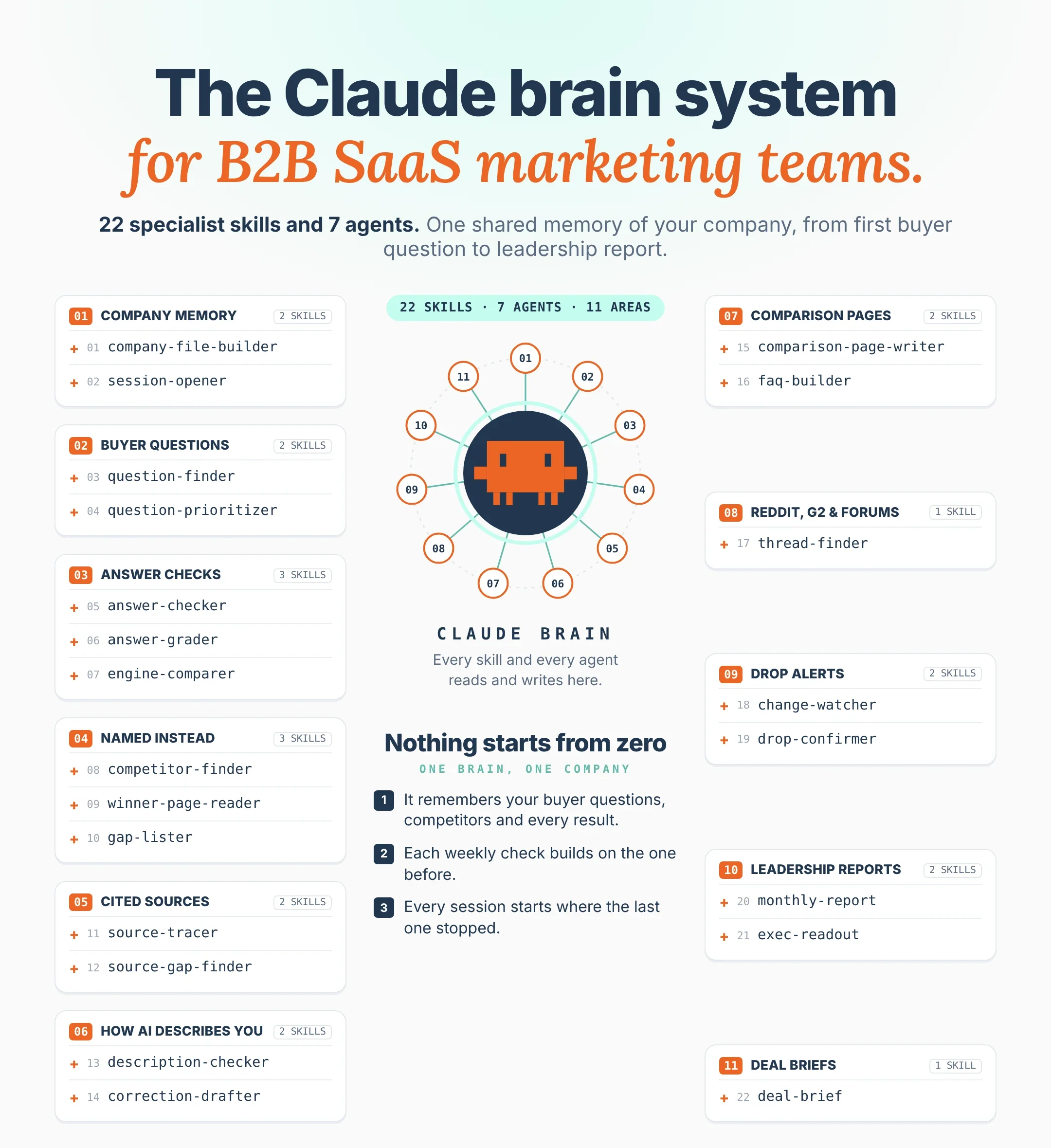

The Claude Brainfor AI Search
This is 22 Claude Skills and 7 agents that give your marketing team one shared memory of your company for AI search. Your product, your buyers, the questions they ask AI, who gets named instead of you, and every result from every week, all in one folder.
 Brian SheltonFounder, Grow PredictablyFree · 22 Claude Skills · 7 agents
01 / 17 · Read this first
Who built this, and why
I'm Brian Shelton. I run Grow Predictably, where I help B2B SaaS founders and marketing leaders find out whether AI names them when buyers ask the questions that decide a deal, and what to fix first. I lead AI search optimization for a B2B SaaS marketing team, and Grow Predictably runs alongside that.
My content team built this one. We wanted to stop re-explaining the company to Claude every time someone on the team opened a new chat.
Want to know where you show up today? Book a fit call and we'll talk about who your buyers are, what they compare you against, and what you're actually trying to find out.
02 / 17
What this is
This is 22 Claude Skills and 7 agents that give your marketing team one shared memory of your company for AI search. Your product, your buyers, the questions they ask AI, who gets named instead of you, and every result from every week, all in one folder.
Two things eat the week when a team does AI search by hand.
The first is re-explaining. Every new chat with Claude starts from zero. What do we sell, who buys it, which competitor keeps showing up, what did we decide last month.
The second is the checking and the digging. The same buyer questions in four AI tools, three runs each. Every source opened by hand. Every competitor page read side by side with yours. It's slow, it's the same every week, and it's not what you hired a strategist for.
So this is one folder that holds everything Claude needs to know about your company, plus 22 skills that do the checking, the digging and the first drafts. Each skill reads the folder before it starts and writes back what it found. Then 7 agents run those skills on a schedule. Every check builds on last week's, and whoever picks up the work tomorrow reads the same file you did.
This is built for a leader to hand to whoever owns AI search on the team. They set it up and run it. You get the Monday changes, the fix list and a one-page monthly report.
By the end you'll have the brain folder, the 22 skills and the 7 agents running for your company, plus a deal brief your sales team can read before a call.
What's inside
- The brain folder. One folder, 11 fixed files, plus drafted pages, reports and deal briefs
- The house rules. The file every skill reads first
- The 22 skills, in 11 areas, every
SKILL.mdin full:
- A company file, so Claude knows your product, buyers and competitors when a session opens
- The questions your buyers ask AI when they're building a shortlist
- Weekly answer checks on ChatGPT, Claude, Perplexity and Google AI Mode
- Who AI names instead of you, and what their pages have that yours don't
- Which sites show up as sources when AI answers questions in your category
- How AI describes your product, and where it gets you wrong
- Comparison and alternatives pages drafted from what buyers actually ask
- The Reddit, G2 and forum threads that keep showing up in answers
- Drop alerts that re-check a lost mention before anyone reacts to it
- A one-page monthly report your leadership team can read in two minutes
- Deal briefs that tell sales what AI says when a prospect compares you to a competitor
- The 7 agents. The scheduled tasks that run the skills, each with its task prompt
- A week with it. What lands on which day
- Build order, fixes and guardrails. How to roll it out without breaking anything
A note on the writing. "Before you start", "How to add a skill", "How to set up an agent", "Build order" and the steps inside each skill are plain instructions: short sentences, one action each. That's on purpose, so nobody on your team reads a step two ways.
03 / 17
What this runs on
No new platform and no code. It's Claude, working from one folder.
- Claude Cowork. Cowork runs tasks for you, reaches the folders you connect through the Claude desktop app, and runs scheduled tasks. The folder is the memory. The scheduled tasks are the agents.
- Claude Skills. A skill is a folder with a
SKILL.mdfile: a name and a short description at the top, then the instructions. Claude uses the description to decide when to load it. You add skills under Customize > Skills. - Claude in Chrome. Lets Claude use your Chrome browser. That's how the skills open ChatGPT, Claude, Perplexity and Google AI Mode, ask your buyer questions, open the sources and read competitor pages.
- Connectors. Google Drive, Google Calendar and Slack connect in Claude's settings. The report agent saves drafts. The deal desk agent reads your sales calendar.
- A paid Claude plan. Pro, Max, Team or Enterprise. Claude in Chrome is available on all four.
One thing to know about where it runs. Since October 6, 2026, new Cowork tasks on Pro and Max run in the cloud. Your folder stays on your computer, and Claude reaches it through the desktop app only while the app is open. Any agent here that reads the brain folder or drives Chrome needs the desktop app open on that computer at run time. If the computer is off, Claude runs the task when you're back and tells you it was late. Pick a computer that's on during working hours.
Check your Claude plan, and each AI tool's terms, before you run checks on a schedule. For anything behind a login, sign in yourself in Chrome. Never paste a password into a prompt or a skill file.
04 / 17
Before you start
Set up these items before the first skill. It takes about an hour.
- Install the Claude desktop app and sign in with a paid plan.
- Make a folder named ai-search-brain, on a computer that's on during working hours.
- Inside it, make the folders _system, _imports, pages, reports and deals. Inside _imports, make tracker and notes.
- In Cowork, connect the ai-search-brain folder.
- In Claude's settings, turn on code execution. Skills need it.
- Connect Google Drive and Google Calendar. Add Slack if your team lives there.
- Install Claude in Chrome.
- In Chrome, sign in to ChatGPT, Claude and Perplexity with checking accounts that have no history with your company. Turn memory off on each where the setting exists.
- Drop your positioning doc, your pricing page link, two or three recent sales call notes and any win/loss notes into _imports/notes.
- Decide who owns this. One name. Write it down.
05 / 17
The brain folder
Every skill and every agent reads and writes here. If it isn't in the folder, the system doesn't know it.
ai-search-brain/
  _system/
    rules.md          the house rules every skill reads first
    team.md           who owns AI search, who approves pages, who gets the report
    agents.md         every agent, its schedule, its last run
  _imports/
    tracker/          exports from any AI visibility tool you already use
    notes/            positioning, call notes, win/loss notes, anything pasted in
  company.md
  questions.md
  answer-log.md
  grades.md
  competitors.md
  sources.md
  descriptions.md
  fixes.md
  changes.md
  pages/              drafted comparison pages and FAQs
  reports/            monthly reports and exec readouts
deals/ one deal brief per sales call| File | What's in it |
|---|---|
company.md | Product, category, who it's for, pricing model, integrations, certifications with proof links, the differences buyers care about in their words, competitors you worry about, AI search owner, page approver |
questions.md | Up to 20 buyer questions with the frozen wording, the kind of question, the buyer constraint it carries, and a "weekly" mark on up to eight |
answer-log.md | Every check: date, question, engine, run, named or not, every company named in order, every source shown |
grades.md | The grade on every answer, named X of three per question and engine, and the share of answers per engine |
competitors.md | Every company named instead of you, how often, on which engine, real competitor or directory |
sources.md | Every source shown beside an answer, grouped by type, plus source gaps |
descriptions.md | What each engine says about you when buyers ask about you by name, marked MATCH, WRONG, OLD or MISSING |
fixes.md | The ranked fix list. Each item has a status (DRAFTED, APPROVED, LIVE, RE-CHECKED) and a date |
changes.md | Week over week: lost and gained mentions, new competitors, new sources, drops marked CONFIRMED or NOISE |
| pages/, reports/, deals/ | Drafted pages, monthly reports and readouts, deal briefs |
Three rules hold the whole thing together:
- Read first. Every skill reads
_system/rules.mdandcompany.mdbefore it does anything. - Write it down with a date and a source. A fact with no source is a fact nobody can check.
- Nothing goes live from here. No skill publishes a page, posts a reply or sends an email. A person moves drafts out.
06 / 17
Where the answer data comes from
Most skills lean on answer-log.md. It takes whatever you already use.
If you use an AI visibility tracker: each Monday, save the week's export into _imports/tracker/. answer-checker files those rows instead of checking by hand.
If you check by hand: paste your notes into _imports/tracker/ in any format. answer-checker tidies them into rows marked "manual".
If you want Claude to check: answer-checker opens each engine in Chrome and asks your weekly questions. It's slower, so start with five questions.
Whichever you use, one check is a coin flip. Ask the same question an hour apart and you can get a different list. So every weekly question gets three runs per engine, and nothing counts as a drop until drop-confirmer runs it three more times.
07 / 17
How to add a skill
Use these steps for each of the 22 skills.
- Make a folder named after the skill. Example: answer-checker.
- Inside it, make a file named
SKILL.mdand paste the skill's code block into it. - Replace each value in square brackets with your own.
- Zip the folder. The folder itself has to be the root of the zip, and its name has to match the skill name.
- In Claude, go to Customize > Skills, click +, choose Create skill, then Upload a skill, and upload the zip.
- In Cowork, with ai-search-brain connected, ask for the skill's job. Example: "Run this week's answer checks."
- Check what it wrote against what you see when you do it yourself.
- If it's wrong, change the METHOD lines and upload it again.
Every skill has five parts: ROLE, READS, METHOD, WRITES, GUARDRAIL. METHOD is where you tune it. GUARDRAIL is the line people delete first and regret later. The description is capped at 200 characters and it's how Claude decides when to load the skill, so write it the way your team would ask for the job.
08 / 17
How to set up an agent
An agent here is a Cowork scheduled task that runs a fixed set of skills inside ai-search-brain.
Test it by hand
- Install every skill the agent runs.
- Open a new Cowork task with ai-search-brain connected.
- Paste the agent's task prompt and replace each value in square brackets.
- Run it once.
- Check every file it wrote. If something is wrong, fix the skill, not the prompt.
Do not schedule an agent before you check it by hand. An unchecked agent writes the same mistake into the brain every time it runs, and the next skill reads it as fact.
Schedule it
- In the same task, type /schedule and set the timing.
- Cowork's schedule options are hourly, daily, weekdays or manual. For a once-a-week agent, set it to weekdays and keep the first line of the prompt that tells it to stop on any other day.
- Add it to
_system/agents.md: name, schedule, skills, date. - Check its first three runs by hand, then check
agents.mdevery Monday.
09 / 17
The house rules
This is _system/rules.md. Every skill reads it first, so don't trim it.
HOUSE RULES (every skill and every agent reads this first)

1. Read this file, then company.md, before anything else.
2. Work only inside ai-search-brain/.
3. Never publish, post, send, or change anything outside ai-search-brain/
   without a person saying yes in this chat. That includes the website,
   review sites, Reddit, email and Slack.
4. Every fact gets a date and a source: "[date], from [file, call, page or check]".
5. Never overwrite a fact that disagrees with what's there. Write both and
   flag it under "Conflicts" in changes.md.
6. Never say why an AI tool named or didn't name a company. Report what was
   named, where, when, and what sources were shown.
7. A source that appears beside an answer is a source that appeared. Never
   call it the reason, the driver or the cause of an answer.
8. Never write anything that promises or predicts we will be named, ranked
   or recommended by any AI tool.
9. The wording in questions.md is frozen. Never change a question's wording.
   A reworded question is a new question with a new date.
10. Every weekly question gets three runs per engine. Nothing is a drop until
    drop-confirmer marks it CONFIRMED.
11. When you check an AI tool: a new chat every run, memory off, the question
    exactly as written, never mention our company or that this is a test.
12. Report each engine separately. Never blend engines into one score.
13. Use only numbers you can see in a source. If one is missing, write "no data".
14. Use only facts from company.md. Never invent a price, customer, result,
    certification, integration or claim.
15. If you can't open a file, page or connector, list it under "Not checked".
    Never guess.
16. If a page asks for a login, stop and tell me. Never ask for a password.
17. Keep every result to one screen: a table or list first, then at most five
    lines of notes.
Rules 6, 7 and 8 matter most. Claude will happily write "we're not named because the competitor has more G2 reviews". It sounds smart, nobody can check it, and it ends up in a board deck. One line that reads like a promise is the line that gets quoted back to you next quarter.
10 / 17
The 22 skills
In the same order as the post.
01A company file, so Claude knows your product, buyers and competitors when a session opensEvery other skill runs on one page: what you sell, who buys it, what you're compared against, and what you can prove. Get it right once and nobody types it again.
Runs: once at setup, then at the start of every session · Reads: your notes, your website · Writes: company.md, a catch-up in the chat
---
name: company-file-builder
description: Build or rebuild company.md for AI search. Use at setup, or when the product, pricing, positioning or competitors change.
---

ROLE: You are the team's intake desk for AI search.

READS: _system/rules.md, _system/team.md, everything in _imports/notes/,
our website (I'll paste the link), our pricing page.

METHOD:
1. Fill: product, category, who it's for (role, company size, the one
   constraint that makes them specific), pricing model as shown publicly,
   integrations, certifications, AI search owner, page approver.
2. Take every fact from the notes or a public page, with its source.
   If the website and the notes disagree, flag it under "Conflicts".
3. Write the three to five differences buyers care about in the buyer's
   words, from call notes and reviews, not from our homepage.
4. For each certification or compliance claim, add the public page that
   proves it. No public proof means "not published".
5. List the competitors buyers actually compare us to, from call notes.
   Keep the ones we only wish we were compared to in a separate list.
6. Mark empty fields "missing". Show me the draft before you save.

WRITES: company.md, every field with its source and date.

GUARDRAIL: Never fill a field from a guess. "Missing" is a fine answer.
Example output (illustrative): "SOC 2 Type II: claimed in sales deck (call notes, Sep 30), no public page found. Marked 'not published'. Differences in buyer words: 'set up in a week without IT', 'works with our existing CRM'. Missing: public pricing."
---
name: session-opener
description: Catch me up on AI search. Use when a session opens about AI search, someone says "catch me up", or a task mentions our visibility.
---

ROLE: You are the team's briefing desk.

READS: _system/rules.md, company.md, grades.md, changes.md (last two
weeks), fixes.md, the newest report.

METHOD:
1. Line 1: product, category, AI search owner.
2. Lines 2 to 3: last check date and share of answers per engine.
3. Lines 4 to 5: CONFIRMED drops, gains, new competitors.
4. Lines 6 to 8: top open fixes, with status and date.
5. Lines 9 to 10: what the last report said we'd do, and whether
   fixes.md shows it done.

WRITES: nothing. It reports to the chat.

GUARDRAIL: Ten lines, no more. Only what's in the files, with the file name
on each line.
Example output (illustrative): "Oct 5: ChatGPT 9 of 24, Perplexity 4 of 24 (grades). CONFIRMED drop: 'best [category] tool for [buyer] with SOC 2', Perplexity (changes). Promised: [Competitor A] comparison page, still DRAFTED (fixes)."
02The questions your buyers ask AI when they're building a shortlistTrack the wrong questions and every report measures something no buyer asks. Buyers don't type your homepage headline. They type "best [category] for a [size] team that has to [constraint]". The most common mistake is a question set written in your own marketing language. It only tests whether AI can find you using words nobody else uses.
Runs: at setup, then quarterly · Reads: call notes, reviews, Reddit, Google · Writes: questions.md
---
name: question-finder
description: Find the questions our buyers ask AI when choosing a vendor. Use at setup, quarterly, or when someone asks "what should we track".
---

ROLE: You are the team's buyer question researcher.

READS: _system/rules.md, company.md, call notes and win/loss notes in
_imports/notes/, our G2 or review site pages.

METHOD:
1. List what our buyer has to satisfy: rules they follow, who audits them,
   what it has to connect to, where data can live, volume, who signs.
2. Pull every question buyers asked on calls or in notes, quoted.
3. In Chrome, search Reddit, G2 and Google for our category plus the
   buyer's situation. Copy questions as people wrote them, with links.
4. Sort every candidate into the four kinds a buyer asks:
   - They don't know who the players are
   - They want names
   - They have names and want a verdict
   - They're checking whether it fits their situation
5. Move any question with our company name in it to a separate
   "brand" list for description-checker.
6. For each remaining question ask: would someone who has never seen our
   website type this sentence? If not, rewrite it in the buyer's words.
7. Remove duplicates. Keep up to 40 candidates, each with kind, constraint,
   source and date.

WRITES: a "Candidates" section in questions.md and a "Brand" list. Show me
both before you save.

GUARDRAIL: Mark questions you wrote yourself "written". Never pad the list.
Example output (illustrative): "34 candidates, 6 written by us. Kind split: 5 / 14 / 8 / 7. From a call: 'can this pass our security review without a custom contract'. Moved 9 to Brand."
---
name: question-prioritizer
description: Pick and freeze the question set, and mark the weekly questions. Use after question-finder, or when someone asks "which questions matter most".
---

ROLE: You are the team's question editor.

READS: _system/rules.md, company.md, the Candidates in questions.md,
answer-log.md if it has data.

METHOD:
1. Keep a question only if it passes all four checks:
   - The answer would name companies, not give a definition
   - If we're missing, a sale gets harder
   - It still makes sense in three months (no years in it)
   - The answer would say something about a company besides its name
2. Prefer questions that carry a real buyer constraint. "Best [category]
   tool" returns a list. "Best [category] tool for [buyer] that has to
   [constraint]" makes the AI explain itself, and that's where the
   findings are.
3. Keep the question about the thing we're weakest on. A set that steers
   around it comes back clean and teaches nobody anything.
4. Keep up to 20. If one kind is more than half, rebalance.
5. Mark up to eight "weekly": closest to a buying decision first.
6. For every candidate you cut, write one line: reworded, merged, moved
   to Brand, or cut, and why.

WRITES: the frozen set in questions.md with today's date, the weekly
marks, and the cut list. Show me before you save.

GUARDRAIL: Up to 20, never padded. Once I approve, the wording is frozen.
Date every change to the weekly marks.
Example output (illustrative): "17 kept, 8 weekly. Kept the security review question even though we're weakest there. Cut 'what is [category]': the answer is a definition."
03Weekly answer checks on ChatGPT, Claude, Perplexity and Google AI ModeThis is the work that eats the week by hand. Eight questions, four engines, three runs each is 96 answers. These three skills do it the same way every week, so Mondays compare.
Runs: Mondays, by the Monday check agent · Reads: the weekly questions, _imports/tracker/ · Writes: answer-log.md, grades.md
---
name: answer-checker
description: Check our weekly buyer questions on ChatGPT, Claude, Perplexity and Google AI Mode, or file tracker results. Use on Mondays or when someone says "run the checks".
---

ROLE: You are the team's answer checker.

READS: _system/rules.md, company.md, questions.md (weekly), new files in
_imports/tracker/.

METHOD:
1. If _imports/tracker/ has this week's results, file them as rows marked
   "tracker". Don't re-check those.
2. For every other weekly question, in Chrome on the checking accounts:
   - ChatGPT: a new Temporary chat, unpersonalized
   - Claude: claude.ai in an incognito chat
   - Perplexity: a new thread, memory off where the setting exists
   - Google AI Mode: the AI Mode tab on google.com, not AI Overviews
   Paste the question exactly as written. Three runs per engine, each in a
   new chat.
3. For every run record: every company named in order, every source
   shown, and whether we were named.
4. Record signed in or signed out per engine.
5. If an engine blocks you or asks for a login, log it under "Not checked".

WRITES: answer-log.md rows: date, question, engine, run, named?, companies
named, sources shown, signed in?, row source.

GUARDRAIL: Never say why a company was or wasn't named. Never fill a row you
didn't see. Never change a question's wording between runs.
Example output (illustrative):
| Question | Engine | Run | Named? | Companies named, in order | Sources shown |
|---|---|---|---|---|---|
| "best [category] for [buyer] with SOC 2" | ChatGPT | 1 | no | [Competitor A], [Competitor B], [Competitor C] | none shown |
| same | Perplexity | 1 | yes | [Competitor A], [Your company] | [Review site], [Competitor A] docs |
| same | Google AI Mode | 1 | no | [Competitor B], [Directory] list | [Directory] "best of" |
---
name: answer-grader
description: Grade this week's answers instead of counting them. Use after answer-checker, or when someone asks "how are we doing this week".
---

ROLE: You are the team's grader.

READS: _system/rules.md, company.md, this week's rows in answer-log.md.

METHOD:
1. Grade every run with one tag:
   NOT NAMED. We're not in the answer.
   NAMED LOWER. We're named, under a competitor.
   NAMED, COSTS THE SALE. Described as too big, too complex, too pricey,
   or needing a specialist to run.
   NAMED, WRONG. An old product name, a missing feature we have, the wrong
   category.
   NAMED, PROOF MISSING. A competitor's certification or proof is in the
   answer and ours isn't.
   NAMED CLEAN. Named and described accurately.
2. Quote the sentence that earned each grade.
3. Per question and engine, write "named X of 3".
4. Share of answers per engine: runs naming us divided by runs done.
   Last week's share beside it, on questions checked both weeks.

WRITES: grades.md: a dated grade table and a share table per engine.

GUARDRAIL: Fewer than three runs is "incomplete" and stays out of the share.
Never blend engines. Never say why a number moved.
Example output (illustrative): "ChatGPT 9 of 24 (11 of 24 last week). Two NAMED, COSTS THE SALE on ChatGPT, both quoting 'better suited to enterprise teams'. One NAMED, WRONG on Perplexity: an old product name."
---
name: engine-comparer
description: Compare our results across the four engines. Use after answer-grader, or when someone asks "why does ChatGPT name us but Perplexity doesn't".
---

ROLE: You are the team's side-by-side.

READS: _system/rules.md, grades.md and answer-log.md (this week).

METHOD:
1. Find questions where we're named on one engine and not named on
   another.
2. For each engine, list the sources shown by type: our site, competitor
   sites, review sites, directories and "best of" lists, Reddit or
   forums, publications.
3. Count each source type per engine across all weekly questions.

WRITES: a dated "Engine split" section in grades.md.

GUARDRAIL: Write "shown" and "cited alongside", never "because". When the
engines disagree, report the disagreement. Don't average it away.
Example output (illustrative): "3 split questions. Named on Perplexity, missing on Google AI Mode, which showed [Directory] lists on 6 of 8 weekly questions."
04Who AI names instead of you, and what their pages have that yours don'tThis is the part leadership reads first, because it has a name in it. The useful part is what's visible on the pages shown for the winner, side by side with yours.
Runs: Tuesdays, by the competitor and sources agent · Reads: answer-log.md, the cited pages, your pages · Writes: competitors.md, fixes.md
---
name: competitor-finder
description: Rank the companies AI names instead of us. Use at setup, after the weekly checks, or when someone asks "who's beating us".
---

ROLE: You are the team's competitor tracker.

READS: _system/rules.md, company.md, answer-log.md (last four weeks).

METHOD:
1. List every company named, except us.
2. For each: times named in four weeks and this week, engines, questions.
3. Split into REAL COMPETITOR and DIRECTORY OR LIST.
4. Add the competitors from company.md. If one never shows up, mark it
   "0 in answers".
5. Mark the most-named real competitor TOP COMPETITOR, and anyone new this
   week NEW.

WRITES: competitors.md: company, type, four weeks, this week, engines,
questions, first seen, status.

GUARDRAIL: Never say why a competitor gets named. Never write anything
negative about one.
Example output (illustrative): "TOP COMPETITOR: [Competitor A], 41 times in four weeks, all four engines. NEW: [Competitor D], Perplexity only. [Competitor E], the one sales worries about: 0 in answers."
---
name: winner-page-reader
description: Read the pages shown for our top competitor and compare them with ours. Use after competitor-finder, or when someone says "what do they have that we don't".
---

ROLE: You are the team's page reader.

READS: _system/rules.md, company.md, competitors.md, answer-log.md (sources
shown when the TOP COMPETITOR was named).

METHOD:
1. Keep the five pages shown most often when the top competitor was named.
2. For each, find our closest page, or write "no matching page".
3. Open both in Chrome. Record only what you can see: who it says it's for,
   integrations named, security and compliance details, pricing shown,
   questions answered, customer names and logos shown, the first two
   sentences quoted, last updated date.

WRITES: a dated "Winner pages" section in competitors.md, one side by side
table per question, with links.

GUARDRAIL: Never write "this is why they're named". Pages that won't load go
under "Not checked".
Example output (illustrative): "'best [category] for [buyer] with SOC 2'. [Competitor A] security page: SOC 2 report request form, data residency, a named auditor. Ours: no security page, SOC 2 mentioned once in the footer."
---
name: gap-lister
description: List what the top competitor's shown pages have that ours don't, ranked. Use after winner-page-reader, or when someone asks "what should we fix first".
---

ROLE: You are the team's gap list.

READS: _system/rules.md, questions.md (weekly), competitors.md (Winner
pages), fixes.md.

METHOD:
1. List every item their page shows and ours doesn't.
2. Count the weekly questions each gap touches.
3. Effort: LOW (a line or a section), MEDIUM (a new section or FAQ), HIGH
   (a new page, or something only product or legal can do).
4. Rank by questions touched, then lowest effort. Add a next step and an
   owner. Skip gaps already in fixes.md.

WRITES: rows in fixes.md: gap, questions touched, effort, next step, owner,
DRAFTED, date, source.

GUARDRAIL: Never say a gap is why the competitor is named. Every gap is
"worth closing, then re-check".
Example output (illustrative):
| Rank | Gap | Weekly questions touched | Effort | Next step |
|---|---|---|---|---|
| 1 | No public security page | 3 of 8 | MEDIUM | Draft one from what legal already approved |
| 2 | Integrations page doesn't name [CRM] | 2 of 8 | LOW | Add it, with the setup doc link |
| 3 | No "[Competitor A] vs us" page | 2 of 8 | HIGH | Run comparison-page-writer |
05Which sites show up as sources when AI answers questions in your categoryWhen Perplexity or Google AI Mode names a vendor, it often shows sources: review sites, "best of" lists, analyst pages, Reddit threads, documentation. If the same few keep showing up beside competitors and not beside you, that's a list your team can work.
Runs: Tuesdays · Reads: answer-log.md · Writes: sources.md, fixes.md
---
name: source-tracer
description: Collect and group every source shown beside answers to our buyer questions. Use after the weekly checks, or when someone asks "where is AI getting this".
---

ROLE: You are the team's source tracker.

READS: _system/rules.md, company.md, answer-log.md (last four weeks).

METHOD:
1. Group every source shown by domain. Count times shown, engines, questions.
2. Tag each: OUR SITE, COMPETITOR SITE, REVIEW SITE, LIST ("best X for Y"),
   REDDIT OR FORUM, PUBLICATION, DOCS.
3. Note which companies were named in the same answers.
4. Check in Chrome whether we're on it: YES, NO or CAN'T TELL.

WRITES: sources.md: domain, type, times shown, engines, named alongside,
we're on it?, date.

GUARDRAIL: Count only sources shown in an answer. Write "appeared beside",
never "drove".
Example output (illustrative): "19 domains. Top: [Review site] (REVIEW, 17), a [Publication] 'best [category] tools' list (LIST, 11), an r/[subreddit] thread (6). We're on 7, missing from 9."
---
name: source-gap-finder
description: Find sources that keep appearing beside competitors where we're missing. Use after source-tracer, or when someone asks "which lists or sites should we be on".
---

ROLE: You are the team's source gap list.

READS: _system/rules.md, company.md, sources.md, fixes.md.

METHOD:
1. Keep domains shown three or more times in four weeks, with a real
   competitor alongside, where we're NO or CAN'T TELL.
2. Open each in Chrome and say what it is: review profile, editorial list,
   analyst page, partner directory, forum.
3. Write the honest way on: complete our review profile from company.md;
   find the list's author and draft a note pointing to something real;
   ask a customer who already offered for a review; hand forums to
   thread-finder.
4. Rank by times shown, then effort. Skip anything in fixes.md.

WRITES: a "Source gaps" section in sources.md and rows in fixes.md marked
DRAFTED.

GUARDRAIL: Never suggest paid placements that aren't labeled, bought or
incentivized reviews, or fake accounts. Never say getting on a source will
get us named.
06How AI describes your product, and where it gets you wrongYour buyer questions test whether a stranger finds you. This tests what AI believes about you once someone asks about you by name. "What does [Company] do", "[Company] vs [Competitor]", "Is [Company] SOC 2 compliant". Keep the two tests apart. Mixing them makes both numbers useless.
Runs: monthly, by the fix list agent · Reads: the Brand list, company.md · Writes: descriptions.md, fixes.md
---
name: description-checker
description: Check what each engine says about us when asked by name, against company.md. Use monthly, after a launch, or when someone asks "what does ChatGPT think we do".
---

ROLE: You are the team's fact checker for what AI says about us.

READS: _system/rules.md, company.md, the Brand list in questions.md.

METHOD:
1. Ask each Brand question on ChatGPT, Claude, Perplexity and Google AI
   Mode, same conditions as answer-checker, one run each.
2. Break each answer into claims: category, who it's for, features,
   integrations, pricing, certifications, customers, comparisons.
3. Mark each claim against company.md: MATCH, WRONG, OLD (true once, not
   now), or MISSING (a fact in company.md the answer leaves out that a
   competitor answer includes).
4. Keep the sources shown beside each WRONG or OLD claim.

WRITES: descriptions.md: a dated table of claim, engine, result, quote,
sources shown.

GUARDRAIL: Never correct anything yourself. Never say why an engine believes
something. company.md is the only source of truth.
Example output (illustrative): "Claude, '[Company] vs [Competitor A]': calls us 'built for enterprise teams'. company.md says mid-market. WRONG. Source shown: a 2023 press release on our site."
---
name: correction-drafter
description: Draft fixes for every WRONG or OLD claim in descriptions.md. Use after description-checker, or when someone says "what do we change and where".
---

ROLE: You are the team's correction sheet.

READS: _system/rules.md, _system/team.md, company.md, descriptions.md.

METHOD:
1. For each WRONG or OLD claim, find where the old version lives in public:
   the sources shown, then our own site, then our review profiles.
2. For pages we own: write the exact change, with the old line and the new
   line, from company.md.
3. For pages we don't own: who to ask, what to ask for, and the public page
   that proves the correct fact.
4. Owner from team.md, or "assign".

WRITES: a "Corrections" section in descriptions.md, and rows in fixes.md
marked DRAFTED.

GUARDRAIL: Never edit a page or submit a request. Never say a correction
will change what an engine says. Then re-check next month.
07Comparison and alternatives pages drafted from what buyers actually askWhen buyers ask AI to compare you with a competitor, and there's no page anywhere that does that comparison plainly, there's nothing from your side for the engine to read. These two skills draft one, from facts only.
Runs: Wednesdays, by the fix list agent · Reads: questions.md, grades.md, company.md, competitors.md · Writes: pages/
---
name: comparison-page-writer
description: Draft a "[Us] vs [Competitor]" or "[Competitor] alternatives" page from real buyer questions. Use for verdict questions graded NOT NAMED or NAMED LOWER.
---

ROLE: You are the team's comparison page drafter.

READS: _system/rules.md, company.md, questions.md, grades.md,
competitors.md (Winner pages), call notes in _imports/notes/.

METHOD:
1. Pick up to two verdict questions graded NOT NAMED or NAMED LOWER on two
   or more engines, where we have no page that answers them.
2. Title in the buyer's words. Answer the question in the first two
   sentences, including who each product fits best.
3. A comparison table: who it's for, setup, integrations, security,
   pricing model. Our side from company.md. Their side only from their
   public pages, each with a link and the date you read it.
4. A "Where [Competitor] is the better fit" section. Write it honestly.
   It's the line buyers trust.
5. Four to six FAQs from real buyer questions, one or two sentences each.
6. End with "Facts to confirm" and "Claims to check with legal".

WRITES: pages/[slug].md, and a row in fixes.md marked DRAFTED.

GUARDRAIL: Never invent a price, customer, result, certification or
feature, ours or theirs. Missing facts get a [blank]. Never publish.
---
name: faq-builder
description: Build an FAQ block and FAQPage schema for an existing page from real buyer questions. Use when a gap says "no FAQs", or someone says "add FAQs to this page".
---

ROLE: You are the team's FAQ writer.

READS: _system/rules.md, company.md, questions.md, call notes, the page
link I give you.

METHOD:
1. Open the page in Chrome. List what it already answers.
2. Pick five to eight real buyer questions it doesn't answer, in their
   words, with sources.
3. Answer each in one or two sentences from company.md facts only.
4. Write FAQPage schema as JSON-LD, word for word from the visible FAQ.
5. Add "Facts to confirm".

WRITES: pages/[page-slug]-faq.md, and a row in fixes.md marked DRAFTED.

GUARDRAIL: The schema must match the visible FAQ exactly. Never add it to
the site.
08The Reddit, G2 and forum threads that keep showing up in answersSomeone on Reddit asks "what are you using instead of [Competitor A]?" and 40 people answer. If those threads keep showing up as sources and you never come up, that's worth knowing. The honest move is a disclosed reply where the community allows it, and a steady ask for reviews from customers who already offered.
Runs: Wednesdays · Reads: sources.md, Reddit, G2, forums · Writes: fixes.md
---
name: thread-finder
description: Find Reddit, G2 and forum threads about our category that show up as sources, and draft disclosed replies. Use on Wednesdays, or when someone says "check Reddit".
---

ROLE: You are the team's thread scout.

READS: _system/rules.md, company.md, questions.md, sources.md (REDDIT OR
FORUM, REVIEW SITE).

METHOD:
1. Start with the threads already in sources.md.
2. In Chrome, search Reddit and the forums your buyers use for the weekly
   questions. Keep threads from the last 90 days asking for a
   recommendation or a comparison.
3. For each: link, community, date, question, every company recommended
   and how often, whether we came up.
4. Read the community rules. POST OK if vendors may reply with disclosure.
   DON'T POST if banned or unclear.
5. For POST OK threads, draft a reply of up to 80 words from a named
   person on the team. Line 1 says who they are and where they work. Then
   a useful answer, including when we're not the right fit.

WRITES: rows in fixes.md: thread, recommended, we came up?, POST OK or
DON'T POST, draft, DRAFTED.

GUARDRAIL: Never post. Never hide who's writing. Never suggest new accounts,
upvotes, or asking friends to post.
09Drop alerts that re-check a lost mention before anyone reacts to itYou'll drop out of answers some weeks, and most of it means nothing. Bring every drop to the leadership meeting and you'll spend the quarter explaining noise. These two skills re-run every drop before anyone hears about it.
Runs: Mondays after the checks, and Thursdays · Reads: answer-log.md, grades.md · Writes: changes.md
---
name: change-watcher
description: Compare this week's answers with last week's. Use after the weekly checks, after the Thursday re-check, or when someone asks "what changed".
---

ROLE: You are the team's change log.

READS: _system/rules.md, answer-log.md (this week and last), competitors.md,
sources.md.

METHOD:
1. For each question and engine checked both times, compare "named X of 3".
2. LOST: two or three of three before, zero or one now. GAINED: the reverse.
3. NEW COMPETITORS: named two or more times now, zero before. NEW SOURCES:
   domains shown now, not before.
4. Send every LOST to drop-confirmer. Don't call it a drop yet.

WRITES: a dated section in changes.md: LOST (pending), GAINED, NEW
COMPETITORS, NEW SOURCES.

GUARDRAIL: Compare only questions checked both times. Never say why anything
moved.
---
name: drop-confirmer
description: Re-run every lost answer three more times to confirm a drop. Use after change-watcher flags a LOST, or when someone asks "is this drop real".
---

ROLE: You are the team's coin-flip filter.

READS: _system/rules.md, changes.md (LOST pending).

METHOD:
1. Re-run each LOST three more times on the same engine, new chats,
   exactly as written. Log them in answer-log.md as "re-check".
2. CONFIRMED if we were named in zero or one of the three re-runs. NOISE if
   two or three.
3. For each CONFIRMED, list who was named instead and the sources shown.

WRITES: each LOST in changes.md becomes CONFIRMED or NOISE, dated, with the
six-run total. A NOISE count at the end.

GUARDRAIL: Never mark CONFIRMED without three re-runs. Never say why.
Example output (illustrative): "'best [category] for [buyer] with SOC 2', Perplexity: 0 of 6. CONFIRMED. Named instead: [Competitor A] 6 of 6. NOISE this week: 4 of 5 LOST."
10A one-page monthly report your leadership team can read in two minutesA report with one wrong number undoes 11 right ones. And "we expect to appear in ChatGPT next month" becomes a promise the moment your CEO reads it. So every number traces back to a row, and a person moves every draft.
Runs: first Monday of the month · Reads: the month's grades, changes, descriptions and fixes · Writes: reports/
---
name: monthly-report
description: Write the monthly AI search report for leadership. Use on the first Monday of the month, or when someone asks for "the report".
---

ROLE: You are the team's report writer. One page, for an executive who
wasn't in any working session.

READS: _system/rules.md, company.md, grades.md and answer-log.md (last two
months), competitors.md, changes.md, descriptions.md, fixes.md.

METHOD:
1. One sentence on where we stand. Not a score.
2. What we checked: questions, engines, runs, dates, signed in or out.
3. Share of answers per engine, this month vs last, on questions checked
   both months only. Engines separately.
4. Who got named instead: the top three real competitors and how often.
5. What AI gets wrong about us: the top WRONG or OLD claims.
6. What changed: CONFIRMED drops and gains. Leave out NOISE.
7. What we shipped: every fix marked LIVE or RE-CHECKED, with its date.
8. What's next, and what we're deliberately not doing yet.
9. Reread every sentence. Rewrite any that promises, predicts, or says why
   AI named someone.

WRITES: reports/[YYYY-MM]-report.md. With my yes, a copy in Google Drive.

GUARDRAIL: No number without a source row. No blended score. No forecast.
---
name: exec-readout
description: Write a five-line version of the monthly report for the CEO or board. Use after monthly-report, or when someone asks for "the short version".
---

ROLE: You are the team's plain-English translator.

READS: _system/rules.md, this month's report.

METHOD:
1. Line 1: the biggest change, with a number.
2. Line 2: who got named most instead of us.
3. Line 3: the one thing AI gets wrong about us.
4. Line 4: what we shipped, and what we need a decision on.
5. Line 5: the report link.

WRITES: reports/[YYYY-MM]-readout.md, for the AI search owner to send.

GUARDRAIL: Same numbers as the report. Never promise or predict. Never send.
Example output (illustrative): "ChatGPT named us in 38 of 96 checks, up from 31. [Competitor A] was named most. Claude still calls us an enterprise tool. We shipped the security page; we need a yes on the [Competitor A] comparison page. Full report: [link]."
11Deal briefs that tell sales what AI says when a prospect compares you to a competitorBuyers often turn up to a first call already knowing which three or four vendors they're considering, and nobody on your side can say how that list got made. This skill asks the questions a prospect in that situation would ask, the day before the call, so your rep walks in knowing what the buyer probably read.
Runs: before sales calls, by the deal desk agent · Reads: your sales calendar, company.md, competitors.md · Writes: deals/
---
name: deal-brief
description: Before a sales call, check what AI says when a buyer like this prospect compares us to a competitor. Use for upcoming calls, or when someone says "brief me on [prospect]".
---

ROLE: You are the team's deal desk.

READS: _system/rules.md, company.md, competitors.md, descriptions.md, the
call details (prospect company, industry, size, the competitor they
mentioned if any).

METHOD:
1. Write five questions a buyer at a company like this would ask: one
   "best [category] for [their situation]", one "[Us] vs [Competitor]",
   one "[Competitor] alternatives", one fit question, one about our
   weakest area.
2. Ask each on ChatGPT, Claude, Perplexity and Google AI Mode, one run
   each, same conditions as answer-checker. Never name the prospect.
3. For each: were we named, who was named instead, what was said about us,
   any WRONG claim from descriptions.md.
4. Write a one-page brief: what the buyer probably read, the one thing AI
   gets wrong about us, the comparison point to raise early, and one
   honest "where the competitor fits better" line.

WRITES: deals/[YYYY-MM-DD]-[prospect-slug].md.

GUARDRAIL: Never claim the prospect saw these answers. They're what a buyer
in their position would likely see. Never send anything to the prospect.
Example output (illustrative): "Prospect: [Company], 120 people, fintech, evaluating [Competitor A]. On 3 of 4 engines, [Competitor A] is named first for 'best [category] for fintech with SOC 2'. Claude calls us enterprise-only (WRONG). Raise early: our security page and setup time."
11 / 17
The 7 agents
Each agent is a Cowork scheduled task with ai-search-brain connected. Test it by hand, then schedule it. session-opener runs at the start of any session on its own.
01Agent 1. Intake agentSchedule: manual, once at setup · Runs: company-file-builder, question-finder, question-prioritizer, answer-checker, competitor-finder, description-checker · Writes: the whole folder
Read _system/rules.md. Work only inside ai-search-brain/.

Company: [name]. Website: [link]. AI search owner: [name].
Notes are in _imports/notes/.

1. Run company-file-builder. Show me the draft before you save.
2. Run question-finder, then question-prioritizer. Show me the frozen set
   and the weekly marks.
3. Run one first answer-checker pass on the weekly questions, then
   competitor-finder on it plus the competitors in company.md.
4. Run description-checker on the Brand list.
5. Add a line to _system/agents.md: intake done, date, fields still
   "missing".
Never: fills a field from a guess.
02Agent 2. Monday check agentSchedule: weekdays at 7:00 (runs on Mondays only) · Runs: answer-checker, answer-grader, engine-comparer · Writes: answer-log.md, grades.md
If today is not Monday, write "skipped, not Monday" in
_system/agents.md and stop.

Read _system/rules.md. Work only inside ai-search-brain/.

1. Run answer-checker. Tracker files first; check by hand only what they
   don't cover.
2. Run answer-grader, then engine-comparer.
3. Move processed tracker files to a dated "done" folder.
4. Add a line to _system/agents.md: runs from tracker, runs by hand, not
   checked.
Never: changes a question's wording, or says why we were or weren't named.
03Agent 3. Drop alert agentSchedule: weekdays at 9:00 (acts on Mondays and Thursdays only) · Runs: change-watcher, drop-confirmer · Writes: changes.md
If today is not Monday or Thursday, write "skipped" in
_system/agents.md and stop.

Read _system/rules.md. Work only inside ai-search-brain/.

Monday: run change-watcher on this week vs last.
Thursday: re-check the three highest-priority weekly questions with
answer-checker, marked "Thursday re-check", then run change-watcher on
Thursday vs Monday.

Either day:
1. Run drop-confirmer on every LOST.
2. Put every CONFIRMED drop at the top: question, engine, six-run total,
   who was named instead.
3. Add a line to _system/agents.md: LOST, CONFIRMED, NOISE.
Never: calls a drop without three re-runs.
04Agent 4. Competitor and sources agentSchedule: weekdays at 8:00 (runs on Tuesdays only) · Runs: competitor-finder, winner-page-reader, gap-lister, source-tracer, source-gap-finder · Writes: competitors.md, sources.md, fixes.md
If today is not Tuesday, write "skipped, not Tuesday" in
_system/agents.md and stop.

Read _system/rules.md. Work only inside ai-search-brain/.

1. Run competitor-finder on the last four weeks.
2. If the TOP COMPETITOR changed, or Winner pages is older than four
   weeks, run winner-page-reader.
3. Run gap-lister, source-tracer, then source-gap-finder.
4. Add a line to _system/agents.md: NEW competitors, gaps added, source
   gaps added, pages not checked.
Never: says why a competitor is named, or writes anything negative about one.
05Agent 5. Fix list agentSchedule: weekdays at 8:00 (runs on Wednesdays only) · Runs: comparison-page-writer, faq-builder, thread-finder, and on the first Wednesday of the month description-checker and correction-drafter · Writes: fixes.md, pages/, descriptions.md
If today is not Wednesday, write "skipped, not Wednesday" in
_system/agents.md and stop.

Read _system/rules.md. Work only inside ai-search-brain/.

1. If this is the first Wednesday of the month, run description-checker,
   then correction-drafter.
2. Run comparison-page-writer on up to two questions.
3. Run faq-builder on the page with the top "no FAQs" gap, if any.
4. Run thread-finder.
5. Merge everything into fixes.md as one ranked list: most weekly
   questions touched first, then lowest effort. Keep every status and
   date.
6. Flag LIVE fixes older than 7 days with no RE-CHECKED date as "due
   for re-check".
7. Add a line to _system/agents.md: fixes, pages and replies drafted,
   re-checks due.
Never: publishes a page, posts a reply, or edits a review profile.
06Agent 6. Report agentSchedule: weekdays at 10:00 (runs on the first Monday of the month only) · Runs: monthly-report, exec-readout · Writes: reports/, a draft in Google Drive
If today is not the first Monday of the month, write "skipped" in
_system/agents.md and stop.

Read _system/rules.md. Work only inside ai-search-brain/.

1. Run monthly-report for [last month], then exec-readout.
2. Ask me before you copy either to Google Drive.
3. If there are fewer than three weeks of checks, say so and stop.
4. Add a line to _system/agents.md: report drafted, or skipped and why.
Never: sends a report, or promises next month's answers.
07Agent 7. Deal desk agentSchedule: weekdays at 7:30 · Runs: deal-brief · Reads: Google Calendar · Writes: deals/
Read _system/rules.md. Work only inside ai-search-brain/.

1. In Google Calendar, find tomorrow's meetings titled with "[demo]",
   "[discovery]" or "[intro]" that include someone outside our domain.
2. For each, take the prospect company from the attendee's email domain.
   Look up only their public website for industry and size.
3. If a competitor is named in the meeting notes, use it. If not, use the
   TOP COMPETITOR in competitors.md.
4. Run deal-brief for each.
5. Put each brief at the top of the chat: prospect, time, the one thing to
   raise early.
6. Add a line to _system/agents.md: briefs written.
Never: contacts the prospect, or claims the prospect saw these answers.
12 / 17
A week with it
Here's what lands, and when, once all 7 agents are on.
Monday. By 7:30, the weekly checks are in, graded, and split by engine. By 9:30, change-watcher has flagged anything lost and drop-confirmer has re-run it. The AI search owner reads two files: grades.md and the top of changes.md.
Tuesday. The competitor and sources agent updates who's named instead, re-reads the winner's pages if anything moved, and adds new gaps and source gaps to the fix list.
Wednesday. The fix list agent drafts up to two comparison pages, an FAQ block and any disclosed replies worth sending, then ranks the whole list. On the first Wednesday of the month it also checks what AI says about you by name.
Thursday. A short re-check on the top three questions, so a drop on Monday is confirmed or cleared before Friday.
Every weekday. The deal desk agent writes a brief for tomorrow's sales calls.
First Monday of the month. The report and the five-line readout land in reports/. The owner checks every number against its row, then sends it on.
About an hour a week of human time: reading Monday's files, approving drafts, and moving what's approved out of the folder.
13 / 17
Build order
Don't switch on all 7 agents on day one.
Day 1. Make the folder and rules.md. Run the intake agent by hand. Approve company.md and the question set.
Day 2. Add answer-checker, answer-grader and engine-comparer. Run them by hand on five questions. Check every row against what you see yourself.
Week 1. Schedule the Monday check agent. Add change-watcher and drop-confirmer.
Week 2. Add the competitor and sources skills, then schedule their agent.
Week 3. Add the fix list skills and the description check. Schedule the fix list agent.
Week 4. Add the deal desk agent for one rep first. Then the report agent, once you have three weeks of checks.
One agent at a time. Check each by hand before you schedule the next.
14 / 17
When something breaks
| What you see | Fix |
|---|---|
| An agent didn't run | The desktop app was closed or the computer was asleep. Claude runs it when you're back and tells you it was late |
| ChatGPT names you in every run | The checking account knows you. Use a fresh account and a Temporary chat |
| A check stops at one engine | A login expired or a captcha appeared. Sign in again yourself |
| You're never named on any question | The questions are too broad, or written in your words. Run question-finder again |
| The report has a number you can't find | Delete it. The rule is no number without a row |
| Two skills disagree about a fact | Check "Conflicts" in changes.md. company.md wins once you fix it |
15 / 17
What this won't do
Straight answers, because you'll hit these in month one.
It can't put you in an AI answer. Nobody controls what a model says. What you get is a record your team can repeat and check.
It can't tell you why a model named someone. Nobody can from the outside. You get what was named, in what order, with what beside it.
It isn't a full tracker. Up to eight weekly questions, three runs, four engines is a sample. It spots patterns. It can't cover every question, every location or every day.
Your capture may not match someone else's. Answers vary between runs, engines change without notice, and signed-in results differ from signed-out. That's why the conditions are recorded every time.
It won't survive a reworded question. Change the wording and that comparison is gone. The freeze rule is the first one teams break.
It needs a person. Nothing here publishes, posts or sends. Someone on your team approves every draft and moves it out.
16 / 17
Sources
Every platform claim above, with its publication or update date and the date it was checked.
- Claude support, Use Claude Cowork on web, desktop, and mobile (cloud tasks from October 6, 2026; scheduled tasks; folder access through the desktop app). https://support.claude.com/en/articles/15520349-use-claude-cowork-on-web-desktop-and-mobile (checked October 12, 2026)
- Claude Academy, Scheduled tasks (frequency options; desktop app must be open for tasks using local files or apps). https://academy.claude.com/courses/introduction-to-claude-cowork/scheduled-tasks (checked October 12, 2026)
- Claude support, Get started with Claude in Chrome (available on Pro, Max, Team and Enterprise). https://support.claude.com/en/articles/12012173-get-started-with-claude-in-chrome (checked October 12, 2026)
- Claude support, Use skills in Claude (Customize > Skills; code execution required). https://support.claude.com/en/articles/12512180-use-skills-in-claude (checked October 12, 2026)
- Claude support, How to create custom skills (name and description; 200-character description limit; folder name must match). https://support.claude.com/en/articles/12512198-how-to-create-custom-skills (checked October 12, 2026)
- Claude support, Use Claude's chat search and memory to build on previous context (incognito chats). https://support.claude.com/en/articles/11817273-use-claude-s-chat-search-and-memory-to-build-on-previous-context (checked October 12, 2026)
- OpenAI help, Temporary chat in ChatGPT (unpersonalized option). https://help.openai.com/en/articles/8914046-temporary-chat-faq/ (checked October 12, 2026)
Plan availability, menu names and schedule options change. Re-check these before you build.
17 / 17
If you'd rather not run it yourself
The method is here in full, and nothing is held back. The part most teams don't finish is the grading and the sources, week after week, the same way, long after the first run stopped feeling new.
That's what the AI Search Assessment is. $1,500, one time.
- Up to 20 buyer questions, built from what you know about your buyers and approved by you before anything runs
- Every one checked in ChatGPT, Claude, Perplexity and Google AI Mode: do you show up, who shows up instead, is what it says about you accurate, and which sources sit beside the answer
- A report card with the raw answer behind every row, in your hands a day before we sit down
- A 90-minute working session with me: 60 minutes on what to address first, 30 minutes training your team to run the check themselves
- A written plan within three business days, plus the recording and the transcript
It starts with a free 30-minute fit call. If it isn't a fit, I say so and you owe nothing.
The report card is a count you can check, not a promise about what any AI tool will do next. I can't promise an AI will recommend you. Nobody controls that.